I've been urged to provide a Twitter list for OOW 2012 attendees. You can see last year's list here.
Check out the Storify story of how it unfolded on Twitter (love Storify).

Wednesday, July 11, 2012


Tuesday, July 3, 2012
OBIEE: Where'd my SQL go?
With the introduction of 11g, you can now deploy your opaque views to the database as, well, database views. It will simply wrap up your SQL statement inside a CREATE OR REPLACE VIEW... and run that statement using the connection pool you specified. Of course this means your connection pool has to have privileges to create objects, which may not be the case if you are using "read only" connections.
Anyway, if your development environment is refreshed from production on a regular basis, objects and all, you'll need to redeploy those views. Naturally, you saved that ad-hoc like SQL in subversion or some other source control tool...oops, you didn't?
All is not lost.
First, it's relatively easy, if you have a magnifying glass, to pick out the deployed views, they look like this:
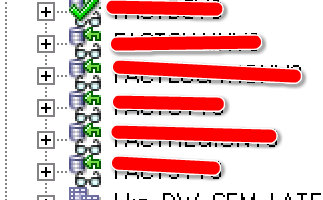
Now, just go into the table properties, General tab and go to the dropdown box:
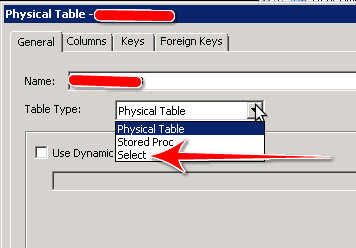
Select the Select selection (hah!). If you're a bit uptight about putting it in the correct location (like I am), you may have to navigate to the appropriate database version. For me, Oracle 10g R2:
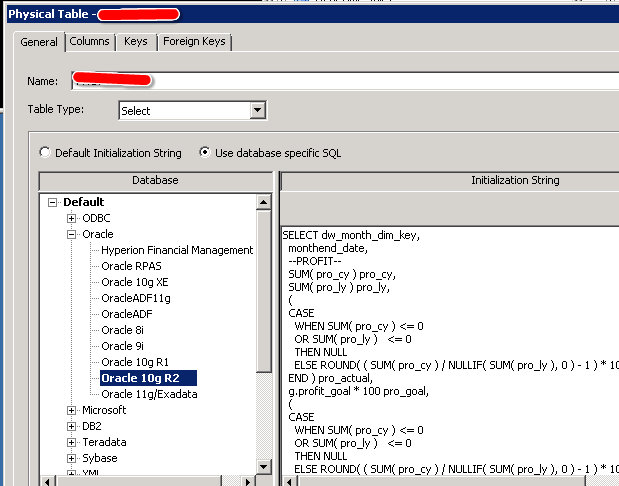
Voilà!
Another option that you could use would be to Copy (Ctrl+C) the object in question and then paste (Ctrl+V) into notepad or some similar tool. Should be fairly easy to spot the SQL.
Anyway, if your development environment is refreshed from production on a regular basis, objects and all, you'll need to redeploy those views. Naturally, you saved that ad-hoc like SQL in subversion or some other source control tool...oops, you didn't?
All is not lost.
First, it's relatively easy, if you have a magnifying glass, to pick out the deployed views, they look like this:
Now, just go into the table properties, General tab and go to the dropdown box:
Select the Select selection (hah!). If you're a bit uptight about putting it in the correct location (like I am), you may have to navigate to the appropriate database version. For me, Oracle 10g R2:
Voilà!
Another option that you could use would be to Copy (Ctrl+C) the object in question and then paste (Ctrl+V) into notepad or some similar tool. Should be fairly easy to spot the SQL.
Thursday, June 14, 2012
TRUNC Time Off Date in OBIEE
"How do I get a prompt to display the day, minus 3 hours?" was the question.
This was a dashboard prompt (calendar widget) with a default value that used the following SQL:
We just needed to add a predicate or WHERE clause. What would I compare it with?
OK, I have a date column (with the no time component), so I can use that. I also have to use OBIEE (Logical) SQL. Gah. I wrote it in Oracle SQL first, day_column = sysdate - ( 3 / 24 ). Wait, I have to TRUNC the date to compare it to a date or else I won't get anything back. day_column = TRUNC( sysdate - ( 3 / 24 ) ). Better. I test it out and it does what I need it to do.
Now, to convert it to OBIEE SQL.
Instead of SYSDATE, I'll use CURRENT_DATE. Now I need to subtract 3 hours. TIMESTAMPADD for that.
This was a dashboard prompt (calendar widget) with a default value that used the following SQL:
SELECT CURRENT_DATE
FROM "Subject Area"
OK, easy enough.
We just needed to add a predicate or WHERE clause. What would I compare it with?
OK, I have a date column (with the no time component), so I can use that. I also have to use OBIEE (Logical) SQL. Gah. I wrote it in Oracle SQL first, day_column = sysdate - ( 3 / 24 ). Wait, I have to TRUNC the date to compare it to a date or else I won't get anything back. day_column = TRUNC( sysdate - ( 3 / 24 ) ). Better. I test it out and it does what I need it to do.
Now, to convert it to OBIEE SQL.
Instead of SYSDATE, I'll use CURRENT_DATE. Now I need to subtract 3 hours. TIMESTAMPADD for that.
[nQSError: 22025] Function TimestampAdd is called with an incompatible type. (HY000)Oops. How about CURRENT_TIMESTAMP? Yeah, that works. Here's what I have so far:
TIMESTAMPADD( SQL_TSI_HOUR, -3, CURRENT_TIMESTAMP )That doesn't work either. Ah, the time component, need to get rid of that. TRUNCATE? Nope, it's for numbers. Hmmm...wait, CAST! I'll just cast it to a date which should remove the time component.
CAST( TIMESTAMPADD( SQL_TSI_HOUR, -13, CURRENT_TIMESTAMP ) AS DATE )Awesome. The final logical SQL looks like this:
SELECT CURRENT_DATE
FROM "Subject Area"
WHERE
( ( "Date"."Date" IN ( CAST( TIMESTAMPADD( SQL_TSI_HOUR, -13, CURRENT_TIMESTAMP ) AS DATE ) ) ) )
Easy.
Wednesday, June 6, 2012
KScope 2012 Advanced Registration Ends June 9th!
 It's almost here. Kscope 2012. Just 18 more days.
What's that? You're not going?
Need to justify the trip? Check out the bottom of the registration page here. There are some helpful hints for Developers, Managers and BI/EPM Professionals.
On June 9th, Advance Registration ends. If you hurry, you can save $300. Go now.
If you do sign up in the next three days AND show proof of such, I'll bring you an ORACLENERD T-Shirt (white on black, the classic). Limit 5. Donations always accepted (joke, I won't make you donate...unless I've had a beer, then I'll maybe hassle you for a few minutes, but nothing too harsh, I promise).
Subscribe to:
Posts (Atom)