
Unfortunately, I missed the first half of the meeting due to a flight delay, but from what I did see, it's very cool. If you read the announcement last week, you'll remember that Kris Rice had offered up (aka - threw under the bus) Syme. I made first contact and then passed the baton to our meeting coordinator who finalized the arrangement.
If you want to check out the Unit Testing features, you need the latest release (2.1), which can be found here. To access it, go to Tools --> Unit Testing
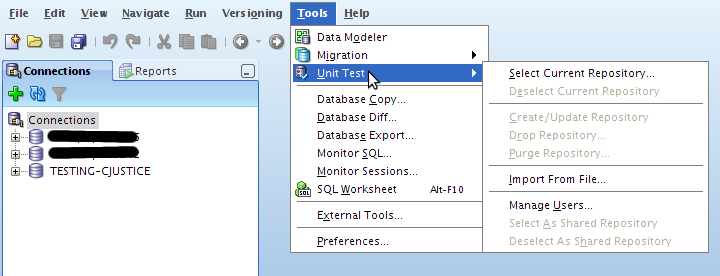
I won't go into gory details simply because I need to use the dang thing first. I'm sure I'll have some posts in the near future.
Anyway, what I did see was pretty slick.
Syme then gave us some history of the product (developed originally by himself and Mr. Rice) and explained a bit more about some of the functionality. Many of you already know about the integration with APEX (I don't know much, other than it exists). That's about to be expanded and will give even more control over many aspects of APEX, including some pretty tight integration with the Unit Testing module.
One really cool thing that he mentioned, if you open up a trace file in SQL Developer, you get a pretty report for it. Apparently reverse engineered from tkprof.
First, find your trace file:

Double click it to open it and you'll see something like this (you'll have to click through on this one):

I will break it down if you're too lazy though.
The first column of the report is the SQL:

Next up are the statistics:

Waits:

and finally Row Sources:

Pretty slick stuff.
Thanks Syme for coming down, hopefully we can get you down here again to show us the rest.


3 comments:
how can a trace be uploaded to the sql developer? can this trace functionality be used for orcle 10.2.0.2 environment?
Rajiv,
I have a local instance so it was just as simple as using the File Navigator (View --> Files) and opening up the file. If you don't have SQL Developer set up on the server (most likely), then you can just copy the .trc files to the computer where you do have it installed. Click it and voila!
chet
Thanks
Post a Comment