
Hat(s) off to Tak Tang. I've used his guide a number of times throughout the years. If he blogs, I can't find it, so if you know about it, please link him up. The first time I used it was back in aught (sp?) 5 to connect to a DB2 instance.
Setup
Database (source): Oracle 10gR2
OS: Windows Vista Ultimate running as a VirtualBox Guest on Ubuntu
Database (target): HP Neoview 2.4 (or something)
OS: Doesn't matter
Materials
HP Neoview driver which can be found here. (Thanks Christian)
Steps
Download the HP Neoview driver and install it. Since it is windows, just click away accepting all the defaults.
Next, configure an ODBC Datasource. I won't go into the gory details, but it's pretty easy. When you are done, you should see something like this:
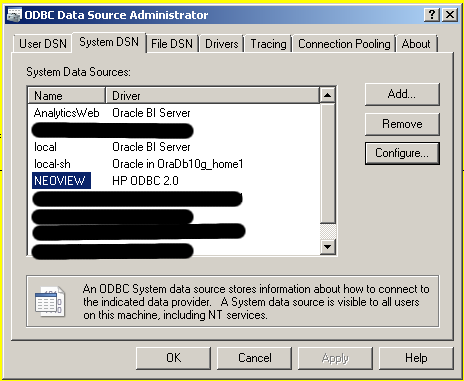
Now comes the fun part.
In your <ORACLE_HOME>\hs\admin directory you should see the following:
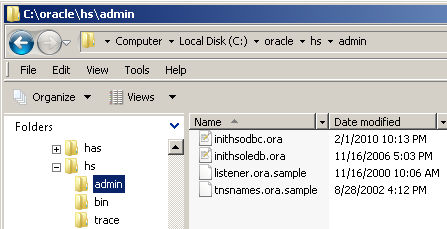
Open up the inithsodbc.ora file and set the parameters as follows:
HS_FDS_CONNECT_INFO = NEOVIEWSave the file as initNEOVIEW.ora in the same directory.
HS_FDS_TRACE_LEVEL = 1
Now traverse to <ORACLE_HOME>\network\admin and open up your listener.ora file. Add a SID_DESC so that your file now looks like this:
LISTENER=Reload or stop and start your listener.
(DESCRIPTION=
(ADDRESS_LIST=
(ADDRESS=(PROTOCOL=tcp)(HOST=localhost)(PORT=1521))
(ADDRESS=(PROTOCOL=ipc)(KEY=extproc))))
SID_LIST_LISTENER=
(SID_LIST=
(SID_DESC=
(GLOBAL_DBNAME=testing)
(ORACLE_HOME=c:\oracle)
(SID_NAME=testing))
(SID_DESC=
(SID_NAME=plsextproc)
(ORACLE_HOME=c:\oracle)
(PROGRAM=extproc))
(SID_DESC=
(SID_NAME=NEOVIEW)
(ORACLE_HOME=c:\oracle)
(PROGRAM=hsodbc)))
Now open up your tnsnames.ora file and add an entry for NEOVIEW. It should look like this:
NEOVIEW =The last step is to create a database link.
(DESCRIPTION=
(ADDRESS_LIST=
(ADDRESS=
(PROTOCOL=TCP)
(HOST=localhost)
(PORT=1521)
)
)
(CONNECT_DATA=(SID=NEOVIEW))
(HS=OK)
)
CREATE DATABASE LINK neoviewYou should be all set now. You can test it out by issuing a simple
CONNECT TO "username"
IDENTIFIED BY "password"
USING 'NEOVIEW';
SELECT * FROM dualIf that works, you're done.
If you have problems, check out Tak's Troubleshooting section.


2 comments:
Hey,
That is pretty slick.
I like this idea of using HS to query exotic databases
Luke,
I agree. Bonus points for being able to use the Oracle data dictionary on top of those other databases. Reduces the need to learn something else. :)
chet
Post a Comment