Showing posts with label install. Show all posts

Wednesday, September 14, 2011

OBIA: Installing Informatica 9.0.1

I'm in the process of building out a tip-to-tail dev/test system that includes the components from OBIA.

The components include:
- EBS Vision database
- Informatica PowerCenter 9.0.1
- Data Warehouse Administration Console (DAC)
- OBIEE 11.1.1.5
- OBIA 7.9.6.3

I recently rebuilt my EBS instance. I put my last go at it on a removable disk and seem to have misplaced it.

This will be part of a series of posts describing the entire process. I don't do it often enough and so I have to "remember" what I did, now I'll have my own reference.

Environment

As usual, this is running in a VirtualBox virtual machine.
- Host: Ubuntu 11.04, Natty Narwhal
- VirtualBox: 4.1.2
- Guest: Oracle Enterprise Linux (64 bit)
Linux oracle-web-tier 2.6.32-200.13.1.el5uek #1 SMP
x86_64 x86_64 x86_64 GNU/Linux
- Installed software: 11gR2 Database, OBIEE 11.1.1.5, Oracle Web Tier

I grabbed the download from edelivery, file name is: V26109-01.zip.

Other references:

- OBIA 7.9.6.3 Documentation Library
- OBIA Installation Guide for Informatica PowerCenter Users Release 7.9.6.3: Specifically this section, Installing Informatica PowerCenter Services.

Step 1, create a database account.
CREATE USER infa IDENTIFIED BY testing
  DEFAULT TABLESPACE users;

GRANT DBA TO infa;
**Note I have given DBA privileges, this is not necessary.**

It is simply easier, for now, to do it this way.

Step 2, unzip the files on your system.

It is recommended that you create an OS user specific to this task. I am using my previously existing oracle (dba, oinstall) account

Step 3, run the install.sh file
[oracle@oracle-web-tier infa_zips]$ ./install.sh
OS detected is Linux
unjar task is in progress.............
unjar of ESD completed.....
Do you want to continue installation (y/n) ?
y
Starting installation ...

\***************************************************************************
\* Welcome to the Informatica 9.0.1 HotFix 2 Server Installer.  *
\***************************************************************************


To verify whether a machine meets the system requirements for an Informatica installation, 
run the Pre-Installation System Check Tool (i9Pi) before you start the installation process. 
You can find the i9Pi tool in the following directory: /i9Pi


Before you continue, read the 9.0.1 HotFix 2 Installation Guide and Release Notes.
You can find the 9.0.1 HotFix 2 documentation in the Documentation Center at 
http://my.informatica.com
Configure the LANG and LC_ALL variables to generate appropriate code pages and 
create and connect to repositories and Repository Services.
Do you want to continue? (Y/N)Y
Installer requires operating system Linux version 2.6 and later.
Current operating system Linux version 2.6.
Current operating system meets minimum requirements.

 Select a choice :  
1.   Install Informatica 9.0.1 with Hot Fix 2 or Upgrade from a previous version of Informatica 
to Informatica 9.0.1 with Hot Fix 2 
2.   Apply Informatica 9.0.1 Hot Fix 2 to existing 9.0.1 install.
Enter the choice(1 or 2):1
 
-----------------------------------------------------------
Checking for existing 9.0.1 HotFix 2 product installation.
Select (G)UI mode (needs X Window support) or (C)onsole mode (G/C):G
Launching installer in GUI mode ...
Preparing to install...
Extracting the JRE from the installer archive...
Unpacking the JRE...
Extracting the installation resources from the installer archive...
Configuring the installer for this system's environment...

Launching installer...

Preparing SILENT Mode Installation...

===============================================================================
Informatica 9.0.1 Services HotFix2               (created with InstallAnywhere)
-------------------------------------------------------------------------------
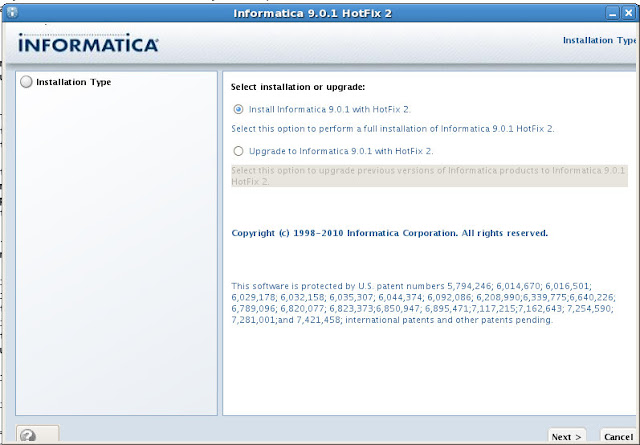

System Requirements:
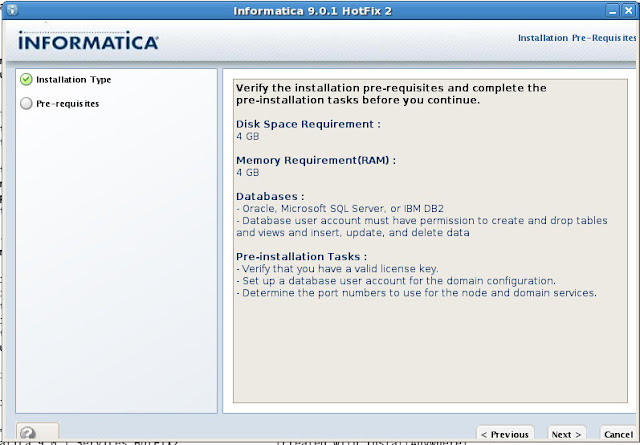


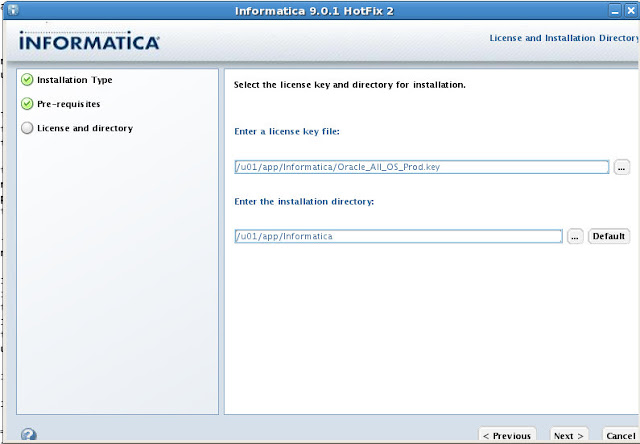
License Key and installation directory:


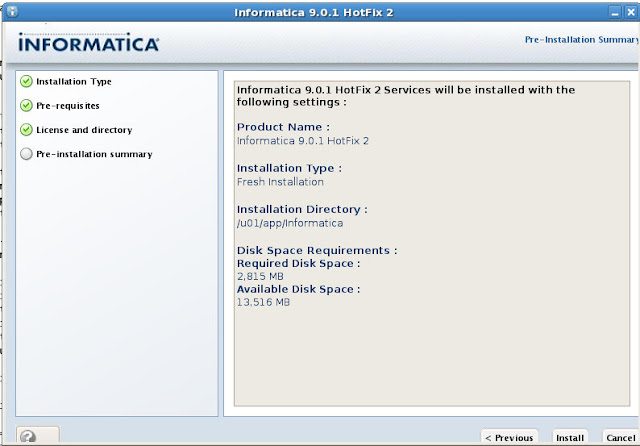
Confirmation:


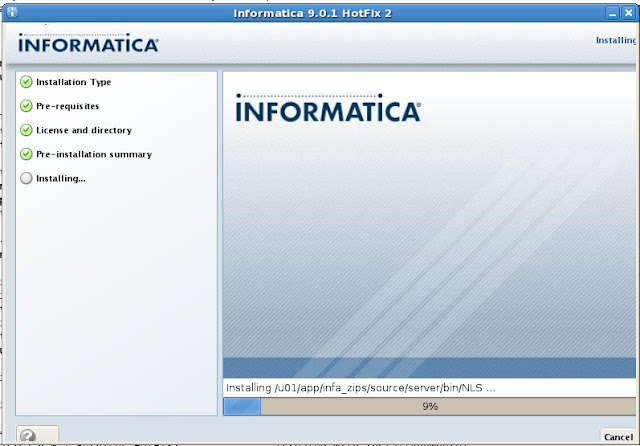
Running...


Configuring...
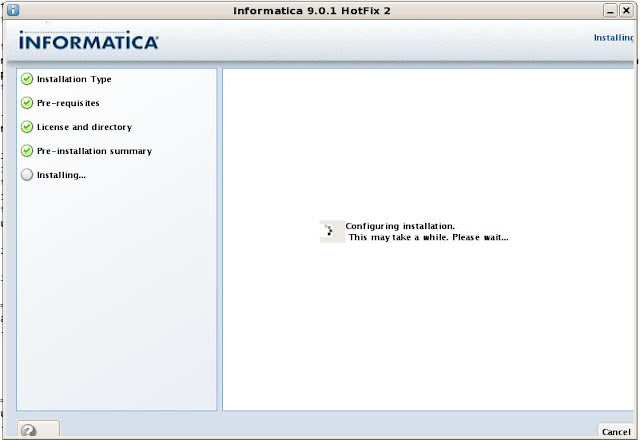


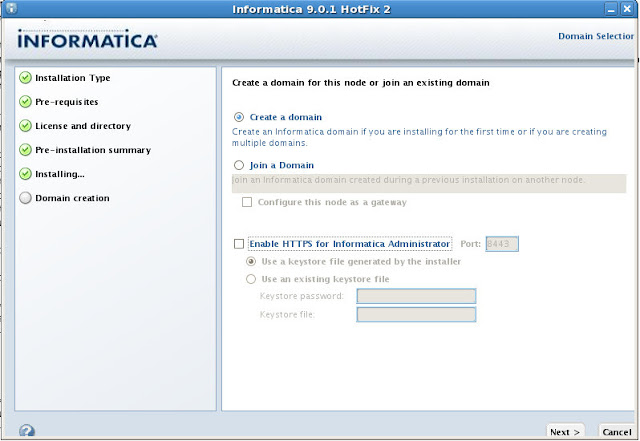
Create a domain and Enable HTTPS. Enable HTTPS is checked by default, I won't be using it.


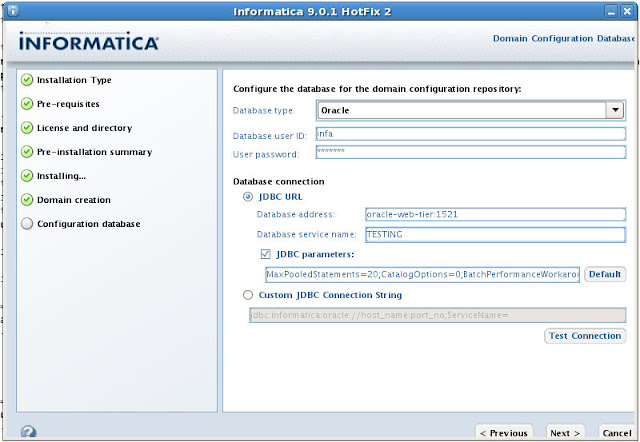
Configure the database connection and JDBC URL


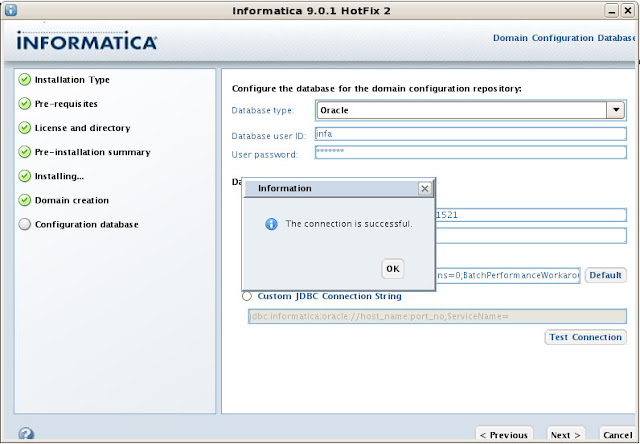
Testing the connection...


Informatica Domain. I'm going to accept the defaults:
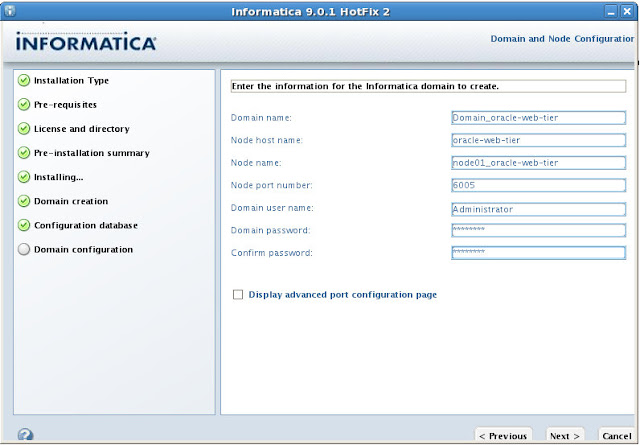


Summary
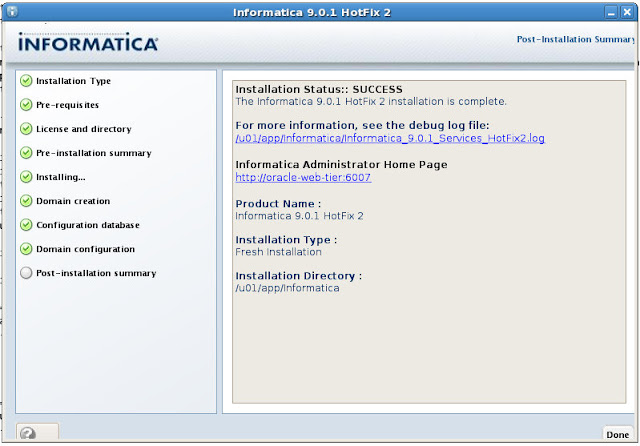

===============================================================================
Configuring Installation...
---------------------------

 [==================|==================|==================|==================]
 [------------------|------------------|------------------|------------------]

Installation Complete.
To verify your installation, open up http://localhost:6007/administrator/, username is administrator and the password is the one you supplied during installation.
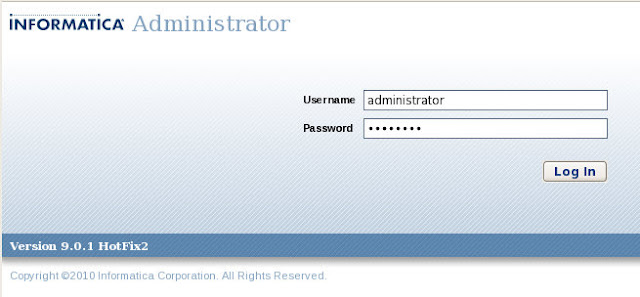


You'll be redirected to this page.
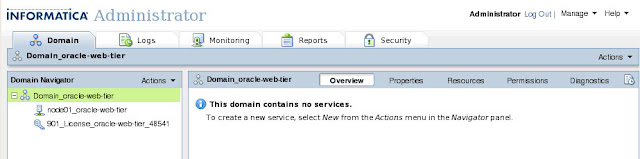


Next steps will be to cover the Information Repository Service and Informatica Integration Service. That of couse, is later.

Thursday, August 11, 2011

OBIEE 11g: opmnctl start: failed. Can not resolve <hostname> for interface any

I've been working on a proof of concept for OBIEE 11g. Part of that, naturally, includes building out the system.

I'm a fan of rebuilding things over and over and over. Yeah, it's time consuming, but I end up learning a lot...like what can go wrong.

Which brings me to today.
OS: OEL 5 64 bit
Database: Oracle 11gR2
OBIEE 11.1.1.5
Installed the database, created the repository using the RCU and installed the OBIEE software; when it gets to the configuration steps, it fails. I think it was step 12 or 13, (re)starting AdminServer.

Retry.

Fail.

Continue.

Failed again a couple of steps down. opmn something or another.

Log files:
opmnctl start: failed.
Can not resolve obiee11g for interface any
oracle.as.provisioning.exception.ASProvisioningException
 at oracle.as.provisioning.engine.Config.executeConfigWorkflow_WLS(Config.java:872)
 at oracle.as.install.bi.biconfig.standard.StandardWorkFlowExecutor.executeHelper(StandardWorkFlowExecutor.java:31)
 at oracle.as.install.bi.biconfig.standard.InstanceProvisioningTask.doExecute(InstanceProvisioningTask.java:81)
...snip...
Caused by: oracle.as.provisioning.engine.CfgWorkflowException
 at oracle.as.provisioning.engine.Engine.processEventResponse(Engine.java:596)
 at oracle.as.provisioning.fmwadmin.ASInstanceProv.createInstance(ASInstanceProv.java:178)
...snip...
 ... 14 more
Caused by: oracle.as.provisioning.util.ConfigException: 
Error creating ASInstance instance1.
Cause: 
An internal operation has failed: Error in starting opmn server
Operation aborted because of a system call failure or internal error
Action: 
See logs for more details.
 at oracle.as.provisioning.util.ConfigException.createConfigException(ConfigException.java:123)
 at oracle.as.provisioning.fmwadmin.ASInstanceProv._createInstance(ASInstanceProv.java:317)
 at oracle.as.provisioning.fmwadmin.ASInstanceProv.createInstance(ASInstanceProv.java:166)
 ... 18 more
Caused by: oracle.as.management.opmn.optic.OpticException: Error in starting opmn server
Operation aborted because of a system call failure or internal error
 at oracle.as.management.opmn.optic.OpmnAdmin.executeCommand(OpmnAdmin.java:310)
 at oracle.as.management.opmn.optic.OpmnAdmin.startOpmnServer(OpmnAdmin.java:87)
 at oracle.as.provisioning.fmwadmin.ASInstanceProv._createInstance(ASInstanceProv.java:254)
 ... 19 more
Awesome.
Can not resolve obiee11g for interface any
I destroyed the OBIEE deployment, reinstalled the repository, tried again. Fail.

Finally gave up and started from scratch.

Opened up the documentation (finally) to see if I missed any pre-installation configuration steps. Nope.

Before you install Oracle Business Intelligence and related components, do the following:

- Review Chapter 1, "Installation Overview," to ensure you understand the options and features related to installing Oracle Business Intelligence.

- Review Chapter 3, "Oracle Business Intelligence Requirements," to ensure that your environment meets the minimum requirements.

- Install your database before running Oracle Business Intelligence 11g Installer, and have the database running during the installation.

- Run Repository Creation Utility (RCU) to install the schemas that Oracle Business Intelligence requires. See Section 3.3, "Create Database Schemas Using the Repository Creation Utility (RCU)."

- If you are installing on multiple computers, review Chapter 2, "Recommended Installation Scenarios for Oracle Business Intelligence," for common scenarios.

- Verify that you have sufficient administrator privileges to install the software.

- If you plan to install Oracle Business Intelligence on a computer that uses Dynamic Host Configuration Protocol (DHCP), you must perform additional configuration tasks before you install Oracle Business Intelligence. See "Installing on DHCP Hosts" in Oracle Fusion Middleware Installation Planning Guide.

- If you plan to install Oracle Business Intelligence 11g on a computer that contains Oracle Business Intelligence 10g, shut down the Oracle Business Intelligence 10g installation before installing Oracle Business Intelligence 11g. To upgrade from Oracle Business Intelligence 10g to Oracle Business Intelligence 11g, refer to Oracle Fusion Middleware Upgrade Guide for Oracle Business Intelligence Enterprise Edition for further details.

- Ensure that your database is not hardened for security purposes, as installing Oracle Business Intelligence against a hardened database is very likely to fail.

Did I do anything unusual in the initial setup?

No.

Wait.

I changed the hostname.

Using the Google Machine, I queried for Can not resolve obiee11g for interface any which took me to this OTN post.

I believe you could totally avoid this if your host file were setup in the manner of having each alias on an individual line. I found that the behavior of how the host file works on newer windows versions (Vista/7/2008) is affected by the DNS Client Service

In the Host file try to use the below format, utting everything on an individual line similar to:
127.0.0.1 localhost
127.0.0.1 MYSERVER
::1 localhost
::1 MYSERVER

Hmmm...

I changed the hostname. I didn't like "new-host-4". Really?

I updated my hosts file to match what was suggested:
# Do not remove the following line, or various programs
# that require network functionality will fail.
127.0.0.1       localhost
127.0.0.1       obiee11g
::1             localhost6
::1             obiee11g
Reran everything and the configuration completed without error.

Joy.

Maybe I should have followed the instructions for Installing on DHCP Hosts...

Tuesday, July 26, 2011

Managing Database Entries (tnsnames.ora)

For the past 18 months or so I've been arguing that if you would just manage your tnsnames.ora file, things would be much easier. I'm talking about through your various SDLC environments, DEV --> QA --> PROD.

This is true for tools like OBIEE.

In OBIEE, you can use the OCI client and specify your tnsname entry for a particular connection. Of course you'll still have to change the password for the connection, but you'll never be at risk of accidentally connecting to the wrong database.

Guess what? My worst case scenario occurred.

Here's what I have suggested; use a generic name for your connection. Let's say TESTING. How it works right now is we have one for each environment, TESTING_DEV, TESTING_QA and TESTING_PROD.

Each server has a tnsnames.ora file with every single connection.

For OBIEE, that means not only changing the password for each environment, but changing the DNS (TNS) entry as well.

Only bad things can come from this.

(I realize there are much more sophisticated ways of managing this, OID (I believe) for instance, but that's outside the scope).

So what happened?

Last week I built out an Informatica PowerCenter server which connected to the Dev database. Following that, I wrote up the instructions, including the particulars of my installation.

The next person up the chain, installing the QA software, read it literally.

Guess what happened?

The Dev server got borked because they used the Dev connection information and all the configuration stuff (technical term) got messed up.

Guess what else?

I get to rebuild the dev machine.

I would contend that the QA server should only have an entry for the QA database...that way this type of thing would never occur. If we had used a generic name for the database, say TESTING, I wouldn't be working tonight.

Something to think about when you end up managing, not only multiple servers, but multiple "platforms" as well.

Thursday, July 14, 2011

How To: Run a Silent Install with Response File

Many of you have done this many, many times.

Tonight was my first.

Environment:
HP-UX, 64bit, Itanium (oops).

I'm using cygwin to ssh into the server. Thanks to John Scott for helping me figure out how to run the GUI installer, well, pointing me in the right direction.

(At one point I asked The Twitter Machine for help, offering T-Shirts in trade for services rendered. Martin Berger, as usual, offered to help. Also, Fuad Arshad, TedC and others that I can't remember right now, I'm sorry).


I tried running xclock and got an error:
$ xclock
Error: Can't open display:
Ah, when I run the ssh command, I have to add a switch/flag thingy in there.
$ ssh -X oraclenerd@hpux
I found that solution here.

After restarting my session, I was able to successfully run xclock. OK, let's try it with the installer.

Wait a second...this line is too slow. 10 minutes for the GUI console to render. Don't ask about trying to do anything, like specify the directory or something silly like that.

I was back to the console method.

However, the first time I did it successfully, I got the Instant Client, which I didn't want.

How do I specify that which installation type I want while using the console? I was not prompted for anything.

Reading around...response file!

Read about response files here.

Like many things that intimidate me, I never bothered to look into it...but it was easy, too easy. That's about the point I kicked myself for being intimidated by that fancy DBA stuff.

So I grabbed the sample file out of response directory, edited it to suit my needs, and I was off and running again.
$ ./runInstaller -silent -responseFile /tmp/client/response/client_response.rsp
Starting Oracle Universal Installer...

Checking Temp space: must be greater than 415 MB. Actual 772 MB Passed
Checking swap space: must be greater than 150 MB. Actual 8192 MB Passed
Preparing to launch Oracle Universal Installer from /tmp/OraInstall2011-07-14_10-22-31PM. Please wait ...

$ You can find the log of this install session at:
/opt/oracle/oraInventory/logs/installActions2011-07-14_10-22-31PM.log
The following configuration scripts need to be executed as the "root" user.
#!/bin/sh
#Root scripts to run

/opt/oracle/product/11.2.0/client/root.sh
To execute the configuration scripts:
1. Open a terminal window
2. Log in as "root"
3. Run the scripts
4. Return to this window and hit "Enter" key to continue

Successfully Setup Software.

Or so I thought...now I need to run the root.sh as root? I'm not root, I'm not in the SUDOers file (or whatever it's called). It took 3 days for me to get the necessary privs to write to /opt/oracle

So now I have to wait for someone with those privs to complete the install.

But hey, I learned something new today.

Tuesday, March 29, 2011

OEL 6 + VirtualBox Guest Additions

I'm taking my first second spin at Oracle Enterprise Linux 6. The first time, I did not install a Desktop, so I was completely lost. I suppose I could do it now...but, I'm not going there just yet.

One of the very first things I do when creating a VM is install the Guest Additions. The main reason is screen size. Out-of-the-box, it's 800x600 or some such non-sense. I'm sure I could cope, if I had to, I'd rather not, it's just annoying. I guess a little perspective is in order:


That's against the backdrop of a 23" monitor. So yeah, annoying.

After having done this about 20 times, I know you need to install some extra packages. Usually the kernel* and make packages. I'll just skip straight to installing the Guest Additions though, let's see what happens.
Nothing to see here.
Well, Guest Additions includes the bi-directional clipboard support, and I'm not in the mood to type up the entire thing. Here's the specific error I received however (typed by hand, you are welcome):
Building the VirtualBox Guest Additions kernel modules
The headers for the current running kernel were not found. If the following
module compilation fails then this could be the reason.
The missing package can be probably [sic] installed with
yum install kernel-devel-2.6.32-100.28.5.el6.x86_64
The output of the log file shows this:
[root@oel6test VBOXADDITIONS_4.0.4_70112]# tail /var/log/vboxadd-install.log -n 100
Makefile:23: *** Error: unable to find the sources of your current Linux kernel.
Specify KERN_DIR= and run Make again.. Stop.
OK, let's try that. The Google Machine told me the kernel lives in /usr/src/kernels/
[root@oel6test VBOXADDITIONS_4.0.4_70112]# export KERN_DIR=/usr/src/kernels/
Run the command again and it tells me that "KERN_DIR does not point to a directory. Stop." No you stop. Whatever.

I then go into the "additional" packages provided by the OEL6 DVD. Funny, now that I look at the kernel* packages, I wonder if they are outdated? uname -r shows me 2.6.32-100.28.5.el6.x86_64 which I believe is correct, but the kernel* packages on the disk look to be in the 2.6.32-71 range. Weird, since I seem to have the latest...

Now, it's time for some public yum, Oracle's public yum server to be exact. Awesome, instructions on the front page on how to set it up, makes it somewhat foolproof for someone like me:

Download and copy the appropriate yum configuration file in place, by running the following commands as root:

Oracle Linux 4, Update 6 or Newer

# cd /etc/yum.repos.d
# mv Oracle-Base.repo Oracle-Base.repo.disabled
# wget http://public-yum.oracle.com/public-yum-el4.repo
Oracle Linux 5

# cd /etc/yum.repos.d
# wget http://public-yum.oracle.com/public-yum-el5.repo
Oracle Linux 6

# cd /etc/yum.repos.d
# wget http://public-yum.oracle.com/public-yum-ol6.repo
Oracle VM 2

# cd /etc/yum.repos.d
# wget http://public-yum.oracle.com/public-yum-ovm2.repo
Enable the appropriate repository by editing the yum configuration file

Open the yum configuration file in a text editor
Locate the section in the file for the repository you plan to update from, e.g. [el4_u6_base]
Change enabled=0 to enabled=1
Begin using yum, for example:

yum list

yum install firefox

And here is where I cheat, sort of. Instead of just using yum, I go to the Add/Remove Software GUI.


Wait just a second...those "%100%" packages have "uek" in them, I thought that was for the Unbreakable Enterprise Kernel. Did I install that? I thought I opted out of that...

So back to the DVD and there are those packages sitting there, of the "uek*100*" variety. Let's install those.
kernel-uek-2.6.32-100.28.5.el6.x86_64.rpm
kernel-uek-debug-2.6.32-100.28.5.el6.x86_64.rpm
kernel-uek-debug-devel-2.6.32-100.28.5.el6.x86_64.rpm
kernel-uek-devel-2.6.32-100.28.5.el6.x86_64.rpm
kernel-uek-doc-2.6.32-100.28.5.el6.noarch.rpm
kernel-uek-firmware-2.6.32-100.28.5.el6.noarch.rpm
kernel-uek-headers-2.6.32-100.28.5.el6.x86_64.rpm
I install the debug, the debug-devel, devel and headers. Reboot.

No joy. But I can see that it can't find the gcc command, so I just have to load that package. Of course it isn't that easy, it has dependencies.
[root@oel6test Packages]# rpm -ivh gcc-4.4.4-13.el6.x86_64.rpm 
warning: gcc-4.4.4-13.el6.x86_64.rpm: Header V3 RSA/SHA256 Signature, key ID ec551f03: NOKEY
error: Failed dependencies:
cloog-ppl >= 0.15 is needed by gcc-4.4.4-13.el6.x86_64
cpp = 4.4.4-13.el6 is needed by gcc-4.4.4-13.el6.x86_64
First up:
[root@oel6test Packages]# rpm -ivh glibc-headers-2.12-1.7.el6.x86_64.rpm 
warning: glibc-headers-2.12-1.7.el6.x86_64.rpm: Header V3 RSA/SHA256 Signature, key ID ec551f03: NOKEY
Preparing... ########################################### [100%]
1:glibc-headers ########################################### [100%]
Now I can load the devel files for glibc.
[root@oel6test Packages]# rpm -ivh glibc-devel-2.12-1.7.el6.x86_64.rpm 
warning: glibc-devel-2.12-1.7.el6.x86_64.rpm: Header V3 RSA/SHA256 Signature, key ID ec551f03: NOKEY
Preparing... ########################################### [100%]
1:glibc-devel ########################################### [100%]
What else?
[root@oel6test Packages]# rpm -ivh cpp-4.4.4-13.el6.x86_64.rpm 
warning: cpp-4.4.4-13.el6.x86_64.rpm: Header V3 RSA/SHA256 Signature, key ID ec551f03: NOKEY
error: Failed dependencies:
libmpfr.so.1()(64bit) is needed by cpp-4.4.4-13.el6.x86_64
Seriously. Since this isn't the first time today, I know what package that so file is from.
[root@oel6test Packages]# rpm -ivh mpfr-2.4.1-6.el6.x86_64.rpm 
warning: mpfr-2.4.1-6.el6.x86_64.rpm: Header V3 RSA/SHA256 Signature, key ID ec551f03: NOKEY
Preparing... ########################################### [100%]
1:mpfr ########################################### [100%]
Now cloog-ppl.
[root@oel6test Packages]# rpm -ivh cloog-ppl-0.15.7-1.2.el6.x86_64.rpm 
warning: cloog-ppl-0.15.7-1.2.el6.x86_64.rpm: Header V3 RSA/SHA256 Signature, key ID ec551f03: NOKEY
error: Failed dependencies:
libppl.so.7()(64bit) is needed by cloog-ppl-0.15.7-1.2.el6.x86_64
libppl_c.so.2()(64bit) is needed by cloog-ppl-0.15.7-1.2.el6.x86_64
What about a ppl* package?
[root@oel6test Packages]# rpm -ivh ppl-0.10.2-11.el6.x86_64.rpm 
warning: ppl-0.10.2-11.el6.x86_64.rpm: Header V3 RSA/SHA256 Signature, key ID ec551f03: NOKEY
Preparing... ########################################### [100%]
1:ppl ########################################### [100%]
Almost there. Back to cloog.
[root@oel6test Packages]# rpm -ivh cloog-ppl-0.15.7-1.2.el6.x86_64.rpm 
warning: cloog-ppl-0.15.7-1.2.el6.x86_64.rpm: Header V3 RSA/SHA256 Signature, key ID ec551f03: NOKEY
Preparing... ########################################### [100%]
1:cloog-ppl ########################################### [100%]
cpp
[root@oel6test Packages]# rpm -ivh cpp-4.4.4-13.el6.x86_64.rpm 
warning: cpp-4.4.4-13.el6.x86_64.rpm: Header V3 RSA/SHA256 Signature, key ID ec551f03: NOKEY
Preparing... ########################################### [100%]
1:cpp ########################################### [100%]
gcc?
[root@oel6test Packages]# rpm -ivh gcc-4.4.4-13.el6.x86_64.rpm 
warning: gcc-4.4.4-13.el6.x86_64.rpm: Header V3 RSA/SHA256 Signature, key ID ec551f03: NOKEY
Preparing... ########################################### [100%]
1:gcc ########################################### [100%]
Yes!

It's working...

Sweet!
[root@oel6test VBOXADDITIONS_4.0.4_70112]# /bin/bash ./VBoxLinuxAdditions.run install
Verifying archive integrity... All good.
Uncompressing VirtualBox 4.0.4 Guest Additions for Linux.........
VirtualBox Guest Additions installer
Removing installed version 4.0.4 of VirtualBox Guest Additions...
Removing existing VirtualBox DKMS kernel modules [ OK ]
Removing existing VirtualBox non-DKMS kernel modules [ OK ]
Building the VirtualBox Guest Additions kernel modules
Your guest system does not seem to have sufficient OpenGL support to enable
accelerated 3D effects (this requires Linux 2.6.27 or later in the guest
system). This Guest Additions feature will be disabled.


Building the main Guest Additions module [ OK ]
Building the shared folder support module [ OK ]
Doing non-kernel setup of the Guest Additions [ OK ]
Starting the VirtualBox Guest Additions [ OK ]
Installing the Window System drivers
Installing X.Org Server 1.7 modules [ OK ]
Setting up the Window System to use the Guest Additions [ OK ]
You may need to restart the hal service and the Window System (or just restart
the guest system) to enable the Guest Additions.

Installing graphics libraries and desktop services componen[ OK ]
Reboot (or just restart your X-windows.


Voila!

Update: 03/30/2011 20:50:00 EST
Thanks to Robin Moffat [blog|@rnm1978] for providing a much simpler solution:
yum install kernel* dkms gcc
Reboot after that and install your Guest Additions. No more having to figure out the dependencies on your own (I'll leave it to you to decide whether that is a good exercise or not).

Update: 02/14/2013 12:00:00 EST
One more addition from Mr. Closson (comments, below).
# yum install kernel-uek-devel 

Thursday, February 24, 2011

katezilla and the EBS eBook

Did I mention that John and I published his awesome 52 part series on doing an EBS Vision install?

Did I mention that all proceeds go to katezilla?

I don't have to link to just the stuff I post here, she has her own Facebook page now (she's classified as a comedian, appropriately), with a vanity url: facebook.com/katezilla.rockstar

That page comes complete with the oh so popular Like Box


Go ahead, Like katezilla. It's easy.

Did I mention that all proceeds go to kate?

I probably did. Technically, they don't go to her directly. They help us to pay for the care she needs. Currently, that consists of Behavioral Therapy (aka PT) which is about 4-5 hours a week. We'd like to do more of course as we believe her therapist has done wonders. We're trying to talk her into spending more time, closer to 10 hours per week. Have I mentioned that the therapists rates would make most of us blush, and we're in IT. Of course she is worth a heck of a lot more, I'm not complaining...I realize the importance of her work in comparison with mine. Her work will last a lifetime, if I'm lucky, mine will last a decade. Even if it did last a decade, it still couldn't even come close to matching the importance of what she does.

Then there's Kate's caretaker/nurselady (aka CT). What can I say, she's just awesome. We have the same situation with her...we would love to have her here more often, but it's near impossible. Perhaps when the house is paid for or the cars (close, very close). Or perhaps we win the lottery. I guess I have to play for that to happen though.

We've had tons of help from my parents, and to a lesser extent other friends and family, financially over the past 6 years. Nothing makes me tear up faster than someone offering to help like that. That people would offer up help, just because, is an amazing act of generosity and kindness. Someone recently complained that we didn't allow customers to order multiple copies of the eBook. I didn't get it at first...why would you want multiple copies of a PDF? Just make a copy.

Oh wait...you want to donate...OK, now I get it. I'm slow sometimes.

We've sold 12 books so far, which I consider a success. John is now a professional author and I am now a professional editor (well...). We just need to sell about 200,000 books to cover Kate's total bills over 6 years. I think we can do it. Lots of people need the EBS Vision install to make themselves a better worker, right?

Buttons would be helpful. :)


Monday, February 14, 2011

EBS Install Guide - The eBook

A mutual friend of John and I suggested we do an eBook. The very first thing I thought of was John's EBS Install Guide (Part I, Part 2, Part 3, and Part 4). If you've read here with any frequency, you'll know that John pretty much took over my site with his guide, occupying many of the top spots...all time. Jerk. This is my 675th post, John has 4. John has 4 of the top 30 spots over the 40+ months I have been blogging in just under 14 months. Jerk. To illustrate:


OK, so 2 of the top 5 spots (not including the root directory). Yikes. Or is it jerk?

Of course John is not a jerk, as much as I would like to paint him as such. He's a great guy and now real-life friend (he didn't kill me after OOW after 4 days). John's guide not only proved useful to me, but has proven useful to many others in the community as well.

Aforementioned friend also suggested that this should be a "for Kate" kind of thing too. You know, to guilt those suckers who may have gotten hold of it without paying into paying.

What's in it?

Well, it's a PDF. It has bookmarks.


It was created using OpenOffice (if it matters). It is 49 pages long and includes a foreword from both John and I.

All 8 posts are contained within this one single document. The 4 hosted here and the 4 hosted on John's site. One stop shopping.

So, if you are about to venture down the (crazy) path of installing EBS for fun (super crazy) or for education (somewhat crazy), this is a great place to start. I know the guide works because even I could install the entire thing, even if it did take me over a month.

Finally, the super cool PayPal buttons:

If there is enough interest, we may port it over to the Kindle, Apple or Lulu. For now, once your order is placed, your "success" page will be the PDF.

Wednesday, September 1, 2010

OBIEE 11g Install - Thoughts

This post is almost a direct copy of my reply to the OBIEE EMG mailing list started by Mark Rittman about Initial Opinions on OBIEE 11g?.

I can't say I've had any success installing the software. So far I've tried on XP Pro (VM on laptop) and Server 2008 (AWS instance). I've chosen the Enterprise install each time.

The laptop I can understand, sort of, as it is severely underpowered. 3 GB RAM total for the machine. I understand the integration with WebLogic/Fusion, but it makes it that much more difficult for those starting out to get it up and running on their personal machines. I can still install the database on my laptop; in fact I have 3 or 4 versions (in VMs) on my machine right now. That's nice.

A couple of days ago, I fired up a cloud Windows Server 2008 server with 18 GB RAM. Installed the database. Created the BI metadata (rcu). Finally began the OBIEE install (Enterprise). It failed finally on one of the configuration steps (12 of 13), I believe it was one of the opmnctl processes.

That said, I haven't read the install documents from front to back yet. I have, however, installed a lot of Oracle software over the years, including EM, OAS (10g), etc. I can usually get the software up and running. This is a different beast though and is not for the weak.

I'll eventually read the docs, sooner rather than later.

On the bright side, installing the latest 11g forces people to learn a bit more about the interactions of the database, EM, WebLogic, etc. That's a good thing.

Wednesday, August 25, 2010

OBIEE 11g Install - Part I

As you may know, OBIEE 11g was released not too long ago.

I downloaded it the day it was available, and have been trying every since to 1, find the time to install it and 2, not break the install process.

Environment
Guest: Windows XP Professional (an old image I had lying around)
VirtualBox 3.2.8
Host: Ubuntu Karmic Koala
Memory: 1.5 GB

In short, my laptop.

I started with the database, 11gR2 32 bit for Windows. No problems there.

As is my MO, I didn't read the installation instructions the first time I fired up the OBIEE installation. I was quickly met with the database connect string. Easy enough, machine:port:service_name.

What's this? You want a specific user? Bollocks.

I let it rest for a couple of days.

Meanwhile, a colleague asked a question about which database he could use. I asked if a version was specified and then quickly scanned the docs. No specific mention of a version...so I said Oracle XE, no 11gR2, no, XE, no, 11gR2. 11gR2, yeah, that's it.

That's when I finally decided to read the installation instructions...and found out I had missed one of the downloads.


Oh, you mean that one?

The Repository Creation Utility. Interesting.

I had heard that some of the new version would be database driven, I had just assumed (yes, I know about assuming) it was more RPD related (and it still may be).

Anyway, that took all of 15 seconds to install.

Back to the installer...and I don't learn any lessons, I tried to install it from my virtual folder, instead of from the "actual" disk. So, it took 4 times before I finally figured that out.

I copied the zip files to the disk, unzipped them and installed the sucker. By install I mean I am in step 12 of 13, Configuring BI Domain. That's the furthest I have gotten so I'm calling it a success.

Now to wipe the disk and start from scratch.

Thursday, January 7, 2010

EBS Oracle VM Templates

OK, now I am angry.

The other day I emailed the Steven Chan, he's the Senior Director at Oracle in Applications Technology Integration, Oracle E-Business Suite Development, about The EBS Challenge. Just a courtesy thing, I wasn't sure if he had seen it or not.

Well, today he wrote me back...

And what did he tell me?

He told me about two recent, and by recent I mean December...you know...about the time I started this whole saga of installing EBS, posts of his.

Actually, I'm not sure who I am more made at, him or John. I suppose I could excuse Steven since we have never interacted before...but John? Are you telling me John didn't know about this? John knew the pain I was going through just to create the stupid 300 GB VDI. John knew!

I can come to no other conclusion than John purposely tortured me. I hate you now John.

Alright...that might be a little harsh. Wait...no, it's not harsh at all. Yes it is.

If you don't feel like going through this exercise yourself, here is the easy way out:

--E-Business Suite 12.1.1 Templates for Oracle VM Now Available
--Using Oracle VM with Oracle E-Business Suite Virtualization Kit

Thanks John...we're not friends anymore. :)

Monday, January 4, 2010

EBS Install Guide - Part 4

By John Piwowar [ blog | twitter ]

This is the fourth and final post in the "Installing E-Business Suite" series, where we'll take a quick look at the GUI. As with the command line interface, going into deep detail would take more time and space than is practical, but I'll try to present some of the high points. I'll close with a final list of useful references for EBS administrators, and then return you to you regularly scheduled oraclenerd programming. Thanks again, Chet!

Part 1 --> Part 2 --> Part 3 --> Part 4

The Navigator
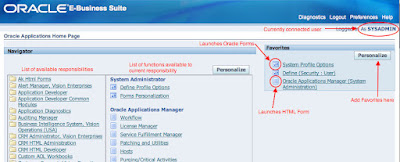
After logging in to Oracle Applications (you remember that from the end of Part 2, right?), you'll be presented with the Navigator. Depending on the responsibilities granted to your user, the length of the list in the left column of the Navigator will vary. When connected as SYSADMIN, you'll most often be interested in the "System Administrator" and "System Administration" responsibilities. Clicking a responsibility will populate the center column of the Navigator with the functions assigned to that responsibility, and clicking one of those functions will take you to that function, either in the HTML interface or the Forms interface. As shown in the screenshot below, the small icons next to the links indicate whether a link will launch Oracle Forms or just take you to another HTML page. To the right of the two Navigator columns is the list of Favorites, which can be especially handy if you've been granted a lot of responsibilities and can't be bothered to remember which responsibility provides your most frequently-used functions.


The SYSADMIN user offers access to a wide variety of responsibilities and functions, particularly in the Vision instance. As you might expect, SYSADMIN also has "superpowers:" some responsibilities offer expanded functionality only to the SYSADMIN user. If you're interested in seeing what a more common, but still fairly powerful, user looks like, you can log in as one of the following users: MFG, OPERATIONS, SERVICES, MRC, or HRMS. These users are seeded in the Vision instance with the password 'welcome'.

The forms interface
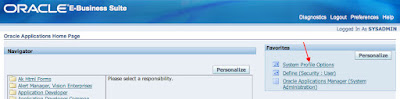
EBS has been evolving to use a more HTML- and Javascript-based UI, but a large proportion of the end-user functionality (and some crucial administrative functions) are presented via Oracle Forms. When you click on a link for a function that is handled by forms, Java will launch the Forms interface for you. It really, really helps in this case to be running on a supported Java+Browser+Operating System combination (Linux users take note: Oracle does not currently plan to certify Linux desktop OS versions to run EBS clients). In addition, make sure that you've either disabled your browser's popup blockers, or added your EBS server to your popup blocker's whitelist, otherwise Forms may fail to launch and you might mistakenly conclude that they're broken. Here's a quick demo of the start of the Forms interface, so you know what to expect. I chose the "System Profile Options" form for convenience, not because it's super-important...though it's certainly a normal amount of important:

Click appropriate link in the Navigator (or, as in this case, the Favorites list...yay, laziness!). A new browser window or tab will open, displaying a Forms servlet launcher. Depending on your browser's security settings, you may be asked a few questions about whether you want your EBS server to be allowed to communicate with your browser. I've found Safari to be particularly persnickety about this.


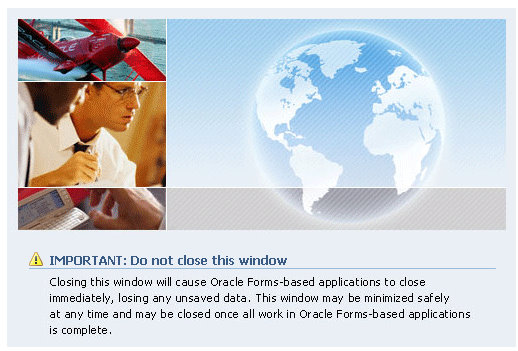
One of the browser windows (or tabs) that will open during the launch of Forms contains a "Do not close this window" warning. Hint: they're not kidding. Make sure it stays open for the duration of your Forms session.


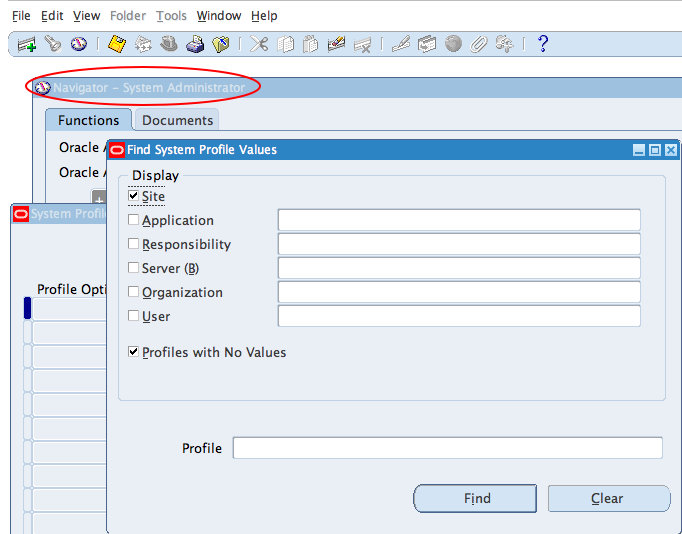
After a bit of waiting and spawning those extra browser windows, you should get a view of the Forms interface. It'll probably try to take over all of your screen real estate (at least it does on my laptop), so it'll be impossible to miss:


A few things to note:
  • The Forms function you selected may be specific enough to require a series of sub-forms, in which case you'll see parent forms open underneath.
  • As with the web interface, there's a Navigator form, with all of the functions available to the current responsibility. If you select the Navigator form, the little "top hat" icon will become active, and you can switch to a new responsibility.
  • You can bask in the warm, comfortable nostalgia of desktop-app-like "File, Edit, Tools, etc" menu system.
  • If you use the Navigator to select a function that is HTML-based, you'll be popped back out into your browser. It might come as a surprise the first few times, but you'll get used to it. ;-)
  • If you close the Navigator window, you'll be asked to confirm that you want to exit Oracle Applications
Diagnostics
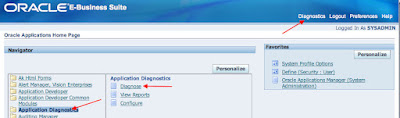
Oracle makes it easy to collect a lot of diagnostic information about the various EBS applications modules and tech stack components. A lot of the diagnostic test output can be packaged up and shipped to Oracle Support to support SR resolution. I've also been able to resolve issues on my own using Diagnostics that I might otherwise have had to open an SR to resolve, which makes the Diagnostics a clear timesaver. Access Diagnostics from either the "Application Diagnostics" responsibility or the "Diagnostics" link at the top of the Oracle Applications home page. Using the responsibility is a bit more straightforward.


I'll spare you a long, screenshot-laden walkthrough of Diagnostics, but you'll find that there are over 280 applications to choose from, each with its own set of tests. The applications AD (Applications DBA), FND (Application Object Library), and SYSTEM_TEST (HTML platform) are probably the most immediately interesting to you at this point. For fun, run the EBusinessSecurity test group under FND and see what holes are left open in a default system. :-)

OAM: Oracle Applications Manager (OAM)
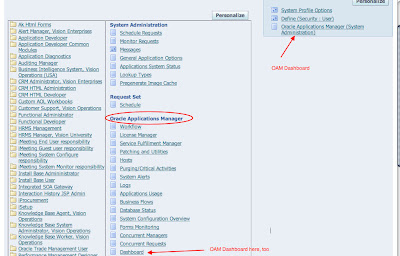
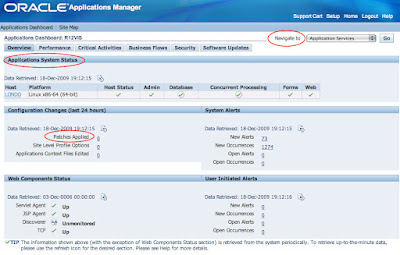
I'm sure I'll lose a lot of "street cred," assuming I've ever had any, for extolling the virtues of a GUI-and-dashboard-based administration interface, but Oracle Applications Manager is pretty nifty. Come to think of it, maybe I'll lose cred just for using a word like "nifty." Oh well. OAM is available to users granted the System Administrator or System Administration responsibility. Access individual OAM functions from those responsibilities, or start at the Dashboard to begin exploring its functionality.


OAM can quickly display the overall health of your system, lets you change some Apps configuration options, provides facilities to report on applied EBS patches and analyze new ones, manage the various moving parts that comprise the Workflow system, and much more. Click around for a bit; they've packed a lot in there:


I should note that OAM and the Diagnostics utilities discussed above are part of the base Oracle Applications system, included as part of standard EBS licensing. OAM should not be confused with the Oracle Applications Management Pack for Grid Control, which is a separately-licensed product.

Standing on the shoulders of giants
Okay, that's a wrap! Thanks for sticking through to the end; I'll leave you with one last list of reference material. If you want to dig further into learning about EBS, here are some useful resources and blogs. I'm bound to miss a lot here, but you won't go very wrong starting with this list:
  • First and foremost, if you aren't following Steven Chan's blog, you are doing yourself a huge disservice. Steven and his blogging team are are all heavily involved in the Applications Technology and Applications Technology Integration groups at Oracle. They will keep you up to date on the evolution of the Oracle Applications tech stack "as it happens," with certification announcements, discussions of advanced features and configurations, and pointers to interesting EBS whitepapers. If you've ever tried to navigate the labyrinth of Oracle's certification matrix, you'll recognize that Steven's list of certifications for the EBS tech stack components alone is worth a visit to his blog. Steven also maintains a list of Apps-related blogs, both within Oracle and in the broader community.
  • The OTN EBS forums are an invaluable resource for getting answers to your EBS questions. Most of the time, it seems like Oracle Ace Hussein Sawwan is holding the entire show together with his encyclopedic knowledge and crazy My Oracle Support skills. There are a lot of very helpful regulars there to pick up the slack when Hussein steps out for dinner, too (I'm not convinced that he sleeps). The EBS on Linux, EBS R12 Install/Upgrade, and EBS Technology General Discussion forums are a good place to start.
  • Atul Kumar's Online Apps DBA blog covers a wide variety of topics related to the technical side of Oracle Applications, including the integration of a wide variety of Oracle products with EBS, and more "real-world" deployment scenarios than this installation guide provides. It seems like there isn't an Oracle product this dude hasn't installed; it's pretty impressive.
  • Eddie Awad's famous OraNA service has an "Applications and Apps Technology" subcategory, and you'll see some interesting tidbits come through there.
  • Ben Prusinski, Oracle Ace and RAC expert, has recently ventured into the realm of Apps DBA work, and many of his recent blog posts have covered R12-related topics.

Sunday, January 3, 2010

My EBS Install Saga - Part II

Finally!

Finally!

After just a little over a month, I've finally gotten this stupid thing installed. Read a bit of my prior trials and tribulations here.

Cost
In total, I believe this cost me about $250.
  • $80 - 320 GB Hard Drive which I didn't use for this install (but meant to)
  • $100 - 1 TB hard drive which I did use for this exercise.
  • $70 - Amazon EC2 usage. Most of the $70 is because I used a 26 ECU machine (8 dual core CPUs, 64 GB RAM)
The EC2 expenses are high mostly because I spent more time connecting and such than actually doing any work. When you have a powerful machine, work is easy (and justifiable). I could download a 1.5 GB file in 3 seconds...well, it seemed like 3 seconds. Plus, I was learning how it all worked.

As far as disk space goes, I didn't have any. Maybe a total of 300 GB to start spread on 3 different disks.

Now I need one of those big ass workstations so I can actually work with this software. Sadly, as I have priced them out, I can't get under $4K. Anyone from HP or Dell (or Apple) reading? Wanna give me one of your workstations? I'll blog about it...a lot.

Instructions
I followed John's instructions to the letter. I received the same error screen as he did

error screen

Checked the logs as instructed, found the problem
error while loading shared libraries: 
libdb.so.2: cannot open shared object file: No such file or directory
The only errata I've found is that mine was a 32 bit system and not a 64 bit system...but who cares? It works.

I followed his instructions to create the symbolic link...I would never in a million years been able to figure that out.

I'm fortunate to have used the 9i and 10g Oracle Application Server and OC4J extensively in the past, I just need to figure out where everything is located.

Resources
My goal is 2 fold
  1. Create a test environment with EBS, OBIEE and OBIA
  2. Prove (or disprove) a theory about integration with APEX I have
That means I need to have room (memory) to run another VM. Not for APEX, but for the OBIEE/DW space.

Very first thing I did was go into the database init file. I changed the sga_target from 1G to 512M and I changed the pga_aggregate_target from 1G to 512M.

Next up, I'll be trimming some of the memory allocation for the OC4J instances...but not yet. I'm just going to bask in the glow of finally getting this thing done.

I'll also read up Part 3 of John's Install Guide and Part 4 will be coming out this week, probably tomorrow afternoon.

John, you are the man! Thanks!

Thursday, December 31, 2009

My EBS Install Saga

(Yes, it is sad that I am writing this on New Year's Eve...I'm on a mission at this point and nothing will stop me).

So I've been trying to follow along with John's EBS Install series...and by trying to follow along I mean I'm still on step 0 (zero).

First, it was a lack of space. 300 GB to be exact. So I went out and bought a 320 Seagate expansion drive. I can't remember that far back, but I think other things came up and I had to requisition that space for other projects.

A couple of weeks ago, I found a 1 TB external drive (USB 2.0) for $100. Couldn't pass it up. Sweet...now I'm all set to do this thing.

Somewhere, somehow, I removed all the carefully managed installation files. Couldn't find them. So I started over. A quick reminder, it's 46.25 GB of download, which takes a total of about 8 hours...even with 25 Mbps down. I am really thankful that Kris Rice doesn't do EBS...he'd be in for a world of hurt.

OK, I'm downloading the files and unzipping them simultaneously...to save a little bit of time. Get everything downloaded and unzipped...this might be where the fun really begins.

If this is your first time, I'm using VirtualBox. The rest of the setup is like this:
-- Dell XPS M1530
-- Intel Duo Core T1555 1.83 Ghz
-- 3 GB RAM
-- 1 TB Seagate External Drive (USB 2.0)
-- Ubuntu Karmic Koala (9.10)

Not the most powerful machine in the world...but decent enough for 99% of everything. Of course by everything I mean everything but EBS.

The first time I created a 300 GB Dynamic HDD. That's the one I downloaded and unzipped all the files too. Upon completion, it had grown to 68.5 GB. OK, let's run it. Kick off the rapidwiz script, run through the first couple of screens and then it does a system check. Oops...there's not enough space. John did say that 350 GB would be preferable...I obviously didn't listen.

OK, so I could either expand that HD or shrink it and add another. Expansion is not possible (yet) in VirtualBox. I tried cloning (not sure why) and still ended up with a 300 GB disk of which 68.5 GB was used.

I then tried to use zerofree so that I could compact it (again, I have no idea why I was trying to do this). Those attempts were very unsuccessful because I couldn't figure out how to make the HD read-only. I did figure out a way later...just add a bad line in /etc/fstab and then you can run zerofree. What was the poing of compacting it though? No idea.

In one of the more recent versions of VirtualBox (I think 3.0), you could add a second HD. At least that's when I noticed that ability. So I created a new Dynamically-expanding 300 GB HD and attached it through the VirtualBox GUI.

Now I was stuck trying to figure out how to mount the stupid thing. Mr. Brad Tumy to the rescue.

Kick off the rapidwiz script, get through all the setup screens and it's installing...I left it over night...and one more night...78 GB had been written to disk.

I killed it.

How about just creating a 300 GB Fixed HD? Tried it...ran for 24 hours...about 60 GB had been created.

I killed it.

Maybe I could use Shared Folders. I consulting The Twitter and was reminded of my recent fun with Shared Folders.

Hmmm....How am I going to do this?

Then an IM with a colleague where he asked about The Cloud. It would be nice to have a test environment, as we are all remote, that we could share. I gave him 2 suggestions, I could buy a beefy machine and host it here at home or I (we) could try to do something in The Cloud.

That got me thinking...The Cloud? Hmmm...let's see if I can install OBIEE there.

I was immediately sold when I downloaded the OBIEE software (1.5 GB) in like 3 seconds (14 or 15 Mbps). I got OBIEE installed and running on Windows...but when I was creating the Instance, I noticed some pretty beefy boxes.

Maybe I could create the 300 GB VDI in The Cloud?

Yes, absolutely!

So I fired up a 20 ECU Windows Server Datacenter (2008?), with 8 dual core CPUs and 7.5 GB of memory. It took 2 hours to create the VDI.

Sweet!

Now...how in the hell am I going to get that 300 GB down to my machine? Since my local drive was attached, perhaps I could just drag and drop it there. Nope...didn't like that.

I'll zip it up!

Using 7zip, I was able to compress it to a very modest 360.9 MB. That's got to be close to a million percent compression right?

Downloaded that via IIS (had to set that up as well) and began to unzip it. First 5 GB took about 5 minutes, so I'm thinking 5 hours. Then it started to crawl. I was at 75 GB after 10 hours which was going to put me at 40 total hours. But it looked like it was exponential...that 40 hours probably would have ended up around 1 million hours. I don't have that kind of time.

I killed it.

Consulted The Twitter again.

@TedC and @jtdavies offered up some suggestions. @TedC told me to use Amazon S3. @jtdavies told me to split it up and use rsync.

Being incredibly impatient and quite possibly very stupid, I "split" the difference. Using my 400 GB attached Volume, I decided to use The File Splitter to split the files. 10 MB chunks. 3000 some odd files. No worries, I'll just zip up every 100 or so, download and unzip.

Until I ran out of room.

*%##@$!!~!@#$%#$#$**&%(*##@@!!!!!!!

Shoot me...now!

I created a second (well, third) volume, 315 GB, which would be the target for the split files. Attached it and began the split...again. This time, 10 GB chunks. I wasn't worried about the size as they compress very nicely. Two of those equals about 24 MB of download.

So I'm almost done with that...about 95% complete. I just have to download 2 more zipped files.

The funner part will be getting those put back together...if it's even possible. I've read up on cat, I just hope it comes through.

If you have any suggestions...or you want to come over to my house or remote into my computer and help me...that would be awesome! :)

The EBS Challenge

I'm going to go ahead and say it, I believe John Piwowar's EBS series has been a success. I'm not talking in hits or those types of metrics because I haven't really analyzed the impact his articles have had. I'm talking about inspiring others to do the same. I believe that's where the real value has come from.

So far John has written 6 articles, 3 here and 3 companion pieces on his sites. He sent me the 4th last weekend (about an hour after the 3rd) which I will post next week (holiday lull here). He claims that's a record for him, 8 articles in a single month.

Anyway, here's the list of people who have decided to take the EBS Challenge:Jake Kuramoto added to the fray by posting an article on John's series, Install the E-Business Suite with Your Pals. Jake worked with EBS back in the 80's I think. :)

I'm pretty sure I left people off this list. So if you know of anyone or are someone using John's install guides, let me know through the various methods of communication (twitter, comments, email, IM, etc). I'll add your name to the list with links and all...would be fun to see how many names we can get on here. If you did use the guide and would like to write up your experiences (I will be writing one myself) and post them here as a guest author, or you want to write it on your own blog, let me know. I'll add links next to your name pointing to your article. Also, there is no time limit either. If you follow the guide next December and would like to be added, I can do that too.

Sunday, December 20, 2009

EBS Install Guide - Part 3

By John Piwowar [ blog | twitter ]
This is the third post in my "Installing E-Business Suite" series. Now that your Vision installation is (hopefully) complete, it's time to start exploring the system a bit. Thanks again to Chet for the opportunity to share here, and for his patience as I took longer than was strictly necessary to finish this installment.

Part 1 --> Part 2 --> Part 3 --> Part 4

It's impossible to provide a comprehensive overview of the various command-line utilities used to manage the E-Business Suite in the space of one (or even a few blog posts, but in this post I'll show you how to start and stop the services, and point you to a few references where you can learn more, if you're into that sort of thing. I don't ever claim perfect memory, but you can probably assume that anything you later discover to be missing was omitted to save space, not because I forgot about it.

Stopping EBS services
It's a good idea to shut down the EBS database ASAP after installation to take a full backup. Before you can shut down the database, you need to shut down the applications tier, or your system will probably become cranky. The "shut down everything" script for the apps tier is called adstpall.sh, and it calls scripts to stop individual components and bring down the system in a (usually) graceful manner. Run adstpall.sh as the applvis user:

[applvis@londo ~]$ $ADMIN_SCRIPTS_HOME/adstpall.sh

You are running adstpall.sh version 120.10

Enter the APPS username: apps
Enter the APPS password:
The logfile for this session is located at
/u01/ebs/R12VIS/inst/apps/R12VIS_londo/logs/appl/admin/log/adstpall.log
Executing service control script:
/u01/ebs/R12VIS/inst/apps/R12VIS_londo/admin/scripts/jtffmctl.sh stop
script returned:
****************************************************
You are running jtffmctl.sh version 120.3
Shutting down Fulfillment Server for R12VIS on port 9355 ...
jtffmctl.sh: exiting with status 0

.end std out.
.end err out.
****************************************************

Executing service control script:
/u01/ebs/R12VIS/inst/apps/R12VIS_londo/admin/scripts/adcmctl.sh stop
script returned:
****************************************************
You are running adcmctl.sh version 120.17.12010000.3
Shutting down concurrent managers for R12VIS ...
ORACLE Password:
Submitted request 5798328 for CONCURRENT FND SHUTDOWN

adcmctl.sh: exiting with status 0

adcmctl.sh: check the logfile
/u01/ebs/R12VIS/inst/apps/R12VIS_londo/logs/appl/admin/log/adcmctl.txt
for more information ...

.end std out.
.end err out.
****************************************************

Executing service control script:
/u01/ebs/R12VIS/inst/apps/R12VIS_londo/admin/scripts/adoafmctl.sh stop
script returned:
****************************************************
ERROR : Timed out( 100000 ): Interrupted Exception
You are running adoafmctl.sh version 120.8
Stopping OPMN managed OAFM OC4J instance ...
****************************************************

Executing service control script:
/u01/ebs/R12VIS/inst/apps/R12VIS_londo/admin/scripts/adformsctl.sh stop
script returned:
****************************************************
ERROR : Timed out( 100000 ): Interrupted Exception
You are running adformsctl.sh version 120.16
Stopping OPMN managed FORMS OC4J instance ...
****************************************************

Executing service control script:
/u01/ebs/R12VIS/inst/apps/R12VIS_londo/admin/scripts/adoacorectl.sh stop
script returned:
****************************************************
ERROR : Timed out( 100000 ): Interrupted Exception
You are running adoacorectl.sh version 120.13
Stopping OPMN managed OACORE OC4J instance ...
****************************************************

Executing service control script:
/u01/ebs/R12VIS/inst/apps/R12VIS_londo/admin/scripts/adapcctl.sh stop
script returned:
****************************************************
You are running adapcctl.sh version 120.7.12010000.2
Stopping OPMN managed Oracle HTTP Server (OHS) instance ...
opmnctl: stopping opmn managed processes...
adapcctl.sh: exiting with status 0
adapcctl.sh: check the logfile
/u01/ebs/R12VIS/inst/apps/R12VIS_londo/logs/appl/admin/log/adapcctl.txt
for more information ...

.end std out.
.end err out.
****************************************************

Executing service control script:
/u01/ebs/R12VIS/inst/apps/R12VIS_londo/admin/scripts/adalnctl.sh stop
script returned:
****************************************************
adalnctl.sh version 120.3
Shutting down listener process APPS_R12VIS.
adalnctl.sh: exiting with status 0

adalnctl.sh: check the logfile
/u01/ebs/R12VIS/inst/apps/R12VIS_londo/logs/appl/admin/log/adalnctl.txt
for more information ...

.end std out.
.end err out.
****************************************************

Executing service control script:
/u01/ebs/R12VIS/inst/apps/R12VIS_londo/admin/scripts/adopmnctl.sh stop
script returned:
****************************************************
You are running adopmnctl.sh version 120.6
Stopping Oracle Process Manager (OPMN) and the managed processes ...
opmnctl: stopping opmn and all managed processes...
adopmnctl.sh: exiting with status 0
adopmnctl.sh: check the logfile
/u01/ebs/R12VIS/inst/apps/R12VIS_londo/logs/appl/admin/log/adopmnctl.txt
for more information ...

.end std out.
.end err out.****************************************************
adstpall.sh:Exiting with status 3
adstpall.sh: check the logfile
/u01/ebs/R12VIS/inst/apps/R12VIS_londo/logs/appl/admin/log/adstpall.log
for more information ...
You may not see the timeout errors listed above for the 10gAS components, but you might, if your server is slow or particularly busy when you're trying to shut down services. Shutting down the apps tier can take a while, particularly while waiting for the concurrent managers to exit. Eventually, though, there shouldn't be any apps-related processes left running:
[applvis@londo ~]$ ps -ef  | grep applvis
applvis 16667 16665 0 19:55 pts/2 00:00:00 -bash
applvis 18927 16667 0 20:34 pts/2 00:00:00 ps -ef
applvis 18928 16667 0 20:34 pts/2 00:00:00 grep applvis
Once the apps are down, switch over to the database software owner (oravis) and shut down the database services. It's possible to do this using the normal lsnrctl and sqlplus commands you already know, but for purposes of completeness (i.e. egregious pedantry), we'll use the EBS-supplied wrapper scripts. First, use addlnctl.sh to stop the listener:
[oravis@londo ~]$ $ORACLE_HOME/appsutil/scripts/$CONTEXT_NAME/addlnctl.sh stop R12VIS
You are running addlnctl.sh version 120.1.12010000.2
Logfile: /u01/ebs/R12VIS/db/tech_st/11.1.0/appsutil/log/R12VIS_londo/addlnctl.txt
Shutting down listener process R12VIS ...
addlnctl.sh: exiting with status 0
Finally, use addbctl.sh to shutdown the database:
[oravis@londo ~]$ $ORACLE_HOME/appsutil/scripts/$CONTEXT_NAME/addbctl.sh stop immediate
You are running addbctl.sh version 120.1

Shutting down database R12VIS ...

SQL*Plus: Release 11.1.0.7.0 - Production on Sat Dec 12 20:44:35 2009
Copyright (c) 1982, 2008, Oracle. All rights reserved.
Connected.
Database closed.
Database dismounted.
ORACLE instance shut down.
Disconnected from Oracle Database 11g Enterprise Edition Release 11.1.0.7.0 - 64bit Production
With the Partitioning, OLAP, Data Mining and Real Application Testing options

addbctl.sh: exiting with status 0
Backing up the database is left as exercise for the reader, but I suggest using RMAN.

Starting EBS components
Okay, time to start everything back up, in reverse order of shutdown. First, the database listener:
[oravis@londo ~]$ export PATH=$PATH:$ORACLE_HOME/appsutil/scripts/$CONTEXT_NAME
[oravis@londo ~]$ addlnctl.sh start R12VIS
You are running addlnctl.sh version 120.1.12010000.2
Logfile: /u01/ebs/R12VIS/db/tech_st/11.1.0/appsutil/log/R12VIS_londo/addlnctl.txt
Starting listener process R12VIS ...

addlnctl.sh: exiting with status 0
Then, the database...
[oravis@londo ~]$ addbctl.sh start
You are running addbctl.sh version 120.1

Starting the database R12VIS ...

SQL*Plus: Release 11.1.0.7.0 - Production on Sat Dec 12 22:29:22 2009
Copyright (c) 1982, 2008, Oracle. All rights reserved.
Connected to an idle instance.
ORACLE instance started.
Total System Global Area 521936896 bytes
Fixed Size 2161272 bytes
Variable Size 218105224 bytes
Database Buffers 289406976 bytes
Redo Buffers 12263424 bytes
Database mounted.
Database opened.
Disconnected from Oracle Database 11g Enterprise Edition Release 11.1.0.7.0 - 64bit Production
With the Partitioning, OLAP, Data Mining and Real Application Testing optionsaddbctl.sh: exiting with status 0
You'll note that I also used the database downtime to downsize the memory footprint of the database a bit. I'll confess that I didn't do any careful testig to arrive at these values; I just whacked a bunch of parameters by 50%. Your mileage may vary. :-)

Finally, back to the applvis user to start up the apps. I'll demonstrate an alternate means of running adstrtal.sh that doesn't involve prompting for a password. This is also a legitimate way to call adstpall.sh, but in both cases, be mindful that the password for the all-powerful APPS database user will be in your command history. Seems convenient on the surface, until you consider the security implications. Yes, it's just a test server, but safety begins in the sandbox. ;-)
[applvis@londo ~]$ adstrtal.sh apps/apps
You are running adstrtal.sh version 120.15
The logfile for this session is located at
/u01/ebs/R12VIS/inst/apps/R12VIS_londo/logs/appl/admin/log/adstrtal.log
Executing service control script:
/u01/ebs/R12VIS/inst/apps/R12VIS_londo/admin/scripts/adopmnctl.sh start
[[I'll spare your eyeballs the full, verbose startup of all the components. It's unsurprisingly similar to the output from running adstpall.sh, and admit it, you didn't really read through that output in great detail either, did you? ]]
adstrtal.sh: check the logfile 
/u01/ebs/R12VIS/inst/apps/R12VIS_londo/logs/appl/admin/log/adstrtal.log for more information ...
Again, on a slower system you may get some timeout errors from the 10gAS components. For your peace of mind, you can check the status of those components with adopmnctl.sh until the status of all the components reads, "Alive."

[applvis@londo ~]$ adopmnctl.sh status
You are running adopmnctl.sh version 120.6
Checking status of OPMN managed processes...
Processes in Instance: R12VIS_londo.londo.local
---------------------------------+--------------------+---------+---------
ias-component | process-type | pid | status
---------------------------------+--------------------+---------+---------
OC4JGroup:default_group | OC4J:oafm | 22974 | Alive
OC4JGroup:default_group | OC4J:forms | 22836 | Alive
OC4JGroup:default_group | OC4J:oacore | 22678 | Alive
HTTP_Server | HTTP_Server | 22619 | Alive
adopmnctl.sh: exiting with status 0
Yay. Carry on, then.

Other important stuff
Now you know how to stop and start Oracle Applications. If you're just going to be exploring the apps as a hobbyist, that should be enough to get you going. There's a lot more to learn, however, if you're interested in understanding common EBS maintenance tasks, including:
  • adadmin: This utility is used to maintain objects in the Apps database and applications tier filesystem. Common tasks include recompiling invalid database objects, regenerating forms and reports files, and enabling and disabling maintenance mode (a required task during patching). adadmin is invoked by the applications owner (applvis in our case). To get an better idea of what adadmin does, type adadmin help=y from the command line, or just type adadmin to invoke its text-based menu system and explore from there.
  • Autoconfig: In the Dark Ages of Oracle Applications, making configuration changes in EBS was fraught with peril. Changing the value of a directory or port for an application server component could involve touching multiple config files, and missing one file could lead to confusing (at best) or disastrous (what's worse than disastrous?) results. Nowadays, Autoconfig takes care of configuration file management for you. The trade-off is that any manual changes made to Autoconfig-managed configuration files will be overwritten when Autoconfig is run. There are two versions of Autoconfig: one for the applications tier ($ADMIN_SCRIPTS_HOME/adautocfg.sh), and one for the database tier ($ORACLE_HOME/appsutil/scripts/$CONTEXT_NAME/adautocfg.sh). In general, you'll be using the apps tier version of Autoconfig much more frequently. It's worth noting that Autoconfig does not manage the database pfile or spfile; changes to database initialization parameters can be made without concerns about Autoconfig clobbering them.
  • adpatch: This may not be relevant to your current sandbox, but in the real world you are unlikely to run an unpatched EBS system. adpatch is the utility that drives the patching process for the applications tier file system and Apps database objects. It does not handle patching the database and application server ORACLE_HOMEs, however, you still get to use the trusty Opatch utility for that.
Almost done!
The 4th and final part of this little "scratching the surface of E-Business Suite" adventure will take a look at a few parts of the UI. You know what that means, right? Yup, more screenshots! I bet you can't wait!

References:
  • Michael Taylor (mdtaylor), Oracle Ace and "installing EBS on unsupported versions of SUSE" guru (among other things), posted some recommendations on OTN for extreme downsizing of the memory consumed by the EBS database and concurrent managers.
  • My Oracle Support Doc 396009.1 breaks down the database initialization parameters for R12. Configure for the low end, unless you're really building out a Vision instance for use by lots of people, in which case you need to stop reading this guide before you get yourself into trouble. ;-)
  • If you're interested in setting up your applvis OS user's environment so that the Apps environment is sourced automatically and the various Apps administration utilities are added to your path at login, I know a guy who wrote not one, but two blog posts about that.
  • Chapter 4 of the Oracle Applications Maintenance Utilities guide covers the adadmin utility
  • The Oracle Applications Patching Procedures guide covers the use of adpatch, and the patching process in general
  • And, finally, Chapter 5 of the Oracle Applications Concepts guide discusses Autoconfig, and provides a context for use of the tool (that's a pretty bad pun, but only if you've read the guide).

Saturday, December 12, 2009

OBIEE: Install on Windows

This install on Windows is not significantly different than it is on Oracle Enterprise Linux, in an effort to maintain my Learning OBIEE page, I felt it necessary.

I know there are differences between the different flavors of Windows, but it certainly doesn't feel like it. I remember installing a 9i EE Database on XP Home 6 or 7 years ago, that was kind of fun.

I'll stop blathering on.
OBIEE: 10.1.3.4
Host: Ubuntu 9.04
Virtual stuff: VirtualBox
Guest OS: Windows Vista Ultimate

From what I understand, OBIEE was originally intended for Windows (Server) environments. All of the client software runs on Windows only. The Server software runs on both *nix and Windows.

So no matter what, I could not avoid a Windows installation. Part II of Installing on OEL would be "Installing the OBIEE Client Software", which is this post. I will not only be installing the Server components, I will be installing the Clients Applications too.

I'll stop blathering on...part II
I've already installed Java 6.

I've located my setup.exe file and start the installation


Next

Specifying the directories, I accept the defaults. I'm also using OC4J. Next.


Complete. Next.


Point to the SDK, enter in my oc4jadmin password...hopefully I'll remember it this time.


Accepting the default, you don't need to enter anything here.


I am setting all the services to start manually. This is a virtual machine and do use it for other things. Next.


English. Next.


Summary. Next.


It's now running.


Small side note, OBIEE installer reported 100% within minutes of starting. It reported 100% completion for about 30 minutes.

Yeah, done. Some notes on OC4J. Next.


Restart your computer. Finish.


Almost 32 minutes to complete.


I've restarted the machine. 0C4J is started automatically (you can turn this off, and I will...eventually)


Now, go into your Services applet. To get there, go to Control Panel --> Administrative Tasks. There you should see an icon that says Services. Scroll down until you see the services that begin with Oracle.


All of these are stopped (trust me).

First up, start the Oracle BI Java Host Service


Next is the Oracle BI Presentation Server


Now let's test them out. Go to http://localhost:9704/


Good.

Now let's login. On the right side of that page, click on Launch. Enter the oc4jadmin password you submitted during installation.


That should take you here


Now for BI Publisher


Check.

And Analytics?


Check.

Applications
Now I just want to make sure I have all the applications.

Administration Tool


Check.

Catalog Manager


Check.

I'll save all the connecting of all the parts for a different post.