Showing posts with label oel. Show all posts

Wednesday, September 14, 2011

OBIA: Installing Informatica 9.0.1

I'm in the process of building out a tip-to-tail dev/test system that includes the components from OBIA.

The components include:
- EBS Vision database
- Informatica PowerCenter 9.0.1
- Data Warehouse Administration Console (DAC)
- OBIEE 11.1.1.5
- OBIA 7.9.6.3

I recently rebuilt my EBS instance. I put my last go at it on a removable disk and seem to have misplaced it.

This will be part of a series of posts describing the entire process. I don't do it often enough and so I have to "remember" what I did, now I'll have my own reference.

Environment

As usual, this is running in a VirtualBox virtual machine.
- Host: Ubuntu 11.04, Natty Narwhal
- VirtualBox: 4.1.2
- Guest: Oracle Enterprise Linux (64 bit)
Linux oracle-web-tier 2.6.32-200.13.1.el5uek #1 SMP
x86_64 x86_64 x86_64 GNU/Linux
- Installed software: 11gR2 Database, OBIEE 11.1.1.5, Oracle Web Tier

I grabbed the download from edelivery, file name is: V26109-01.zip.

Other references:

- OBIA 7.9.6.3 Documentation Library
- OBIA Installation Guide for Informatica PowerCenter Users Release 7.9.6.3: Specifically this section, Installing Informatica PowerCenter Services.

Step 1, create a database account.
CREATE USER infa IDENTIFIED BY testing
  DEFAULT TABLESPACE users;

GRANT DBA TO infa;
**Note I have given DBA privileges, this is not necessary.**

It is simply easier, for now, to do it this way.

Step 2, unzip the files on your system.

It is recommended that you create an OS user specific to this task. I am using my previously existing oracle (dba, oinstall) account

Step 3, run the install.sh file
[oracle@oracle-web-tier infa_zips]$ ./install.sh
OS detected is Linux
unjar task is in progress.............
unjar of ESD completed.....
Do you want to continue installation (y/n) ?
y
Starting installation ...

\***************************************************************************
\* Welcome to the Informatica 9.0.1 HotFix 2 Server Installer.  *
\***************************************************************************


To verify whether a machine meets the system requirements for an Informatica installation, 
run the Pre-Installation System Check Tool (i9Pi) before you start the installation process. 
You can find the i9Pi tool in the following directory: /i9Pi


Before you continue, read the 9.0.1 HotFix 2 Installation Guide and Release Notes.
You can find the 9.0.1 HotFix 2 documentation in the Documentation Center at 
http://my.informatica.com
Configure the LANG and LC_ALL variables to generate appropriate code pages and 
create and connect to repositories and Repository Services.
Do you want to continue? (Y/N)Y
Installer requires operating system Linux version 2.6 and later.
Current operating system Linux version 2.6.
Current operating system meets minimum requirements.

 Select a choice :  
1.   Install Informatica 9.0.1 with Hot Fix 2 or Upgrade from a previous version of Informatica 
to Informatica 9.0.1 with Hot Fix 2 
2.   Apply Informatica 9.0.1 Hot Fix 2 to existing 9.0.1 install.
Enter the choice(1 or 2):1
 
-----------------------------------------------------------
Checking for existing 9.0.1 HotFix 2 product installation.
Select (G)UI mode (needs X Window support) or (C)onsole mode (G/C):G
Launching installer in GUI mode ...
Preparing to install...
Extracting the JRE from the installer archive...
Unpacking the JRE...
Extracting the installation resources from the installer archive...
Configuring the installer for this system's environment...

Launching installer...

Preparing SILENT Mode Installation...

===============================================================================
Informatica 9.0.1 Services HotFix2               (created with InstallAnywhere)
-------------------------------------------------------------------------------
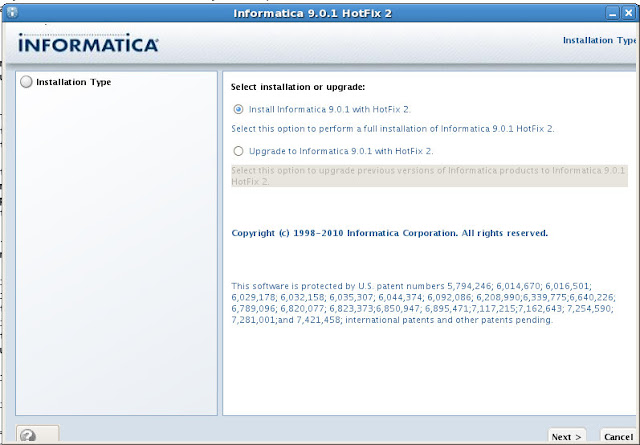

System Requirements:
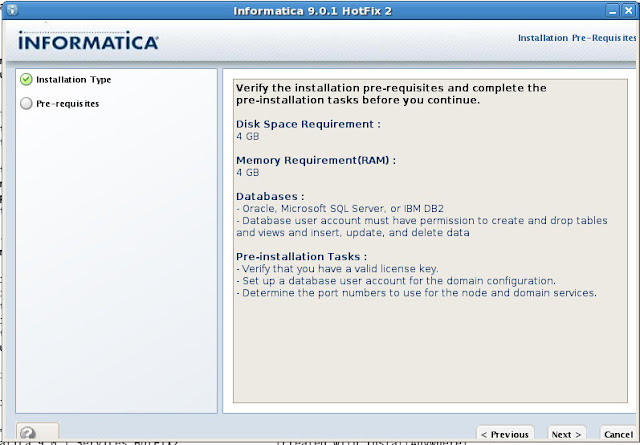


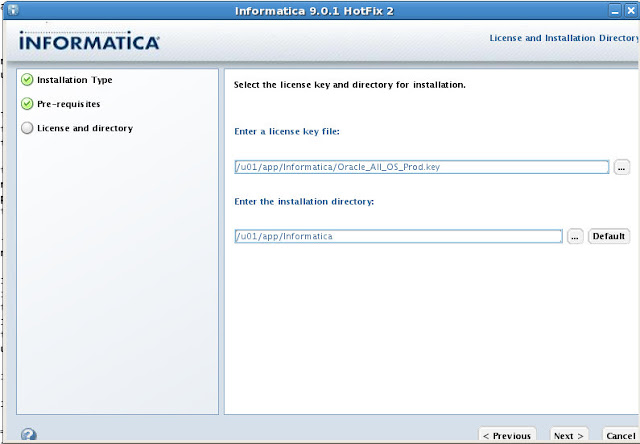
License Key and installation directory:


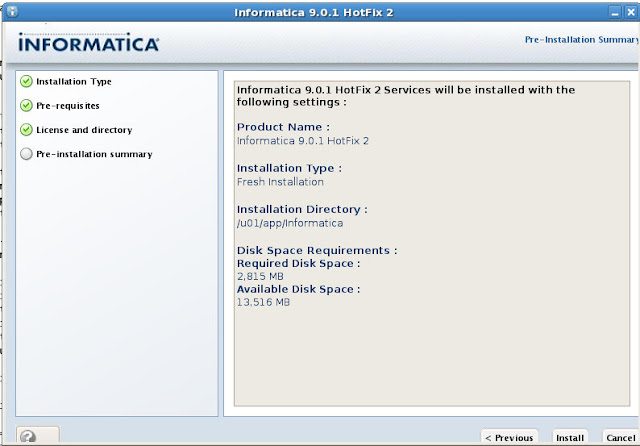
Confirmation:


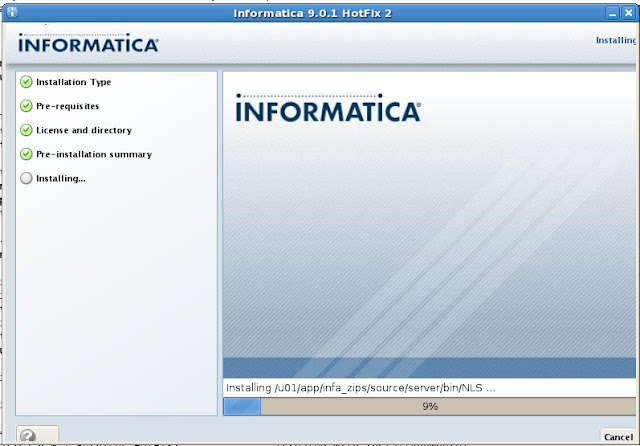
Running...


Configuring...


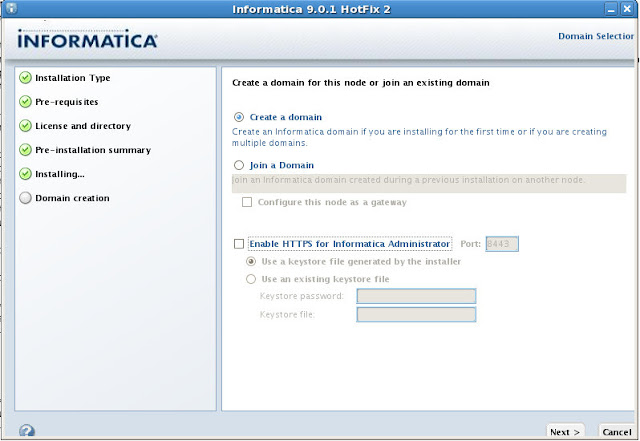
Create a domain and Enable HTTPS. Enable HTTPS is checked by default, I won't be using it.


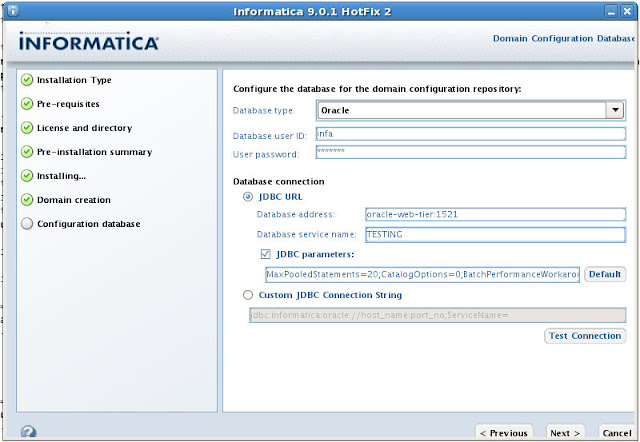
Configure the database connection and JDBC URL


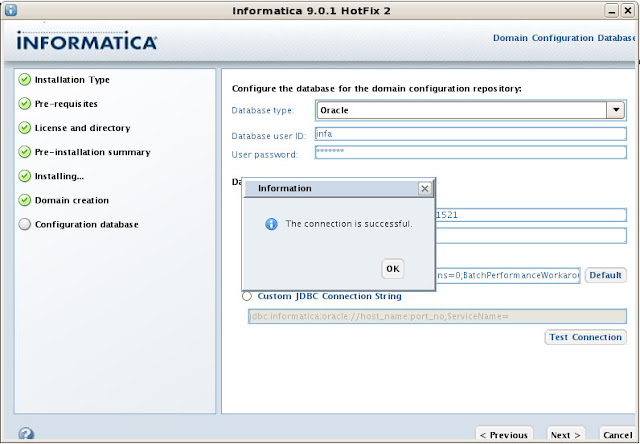
Testing the connection...


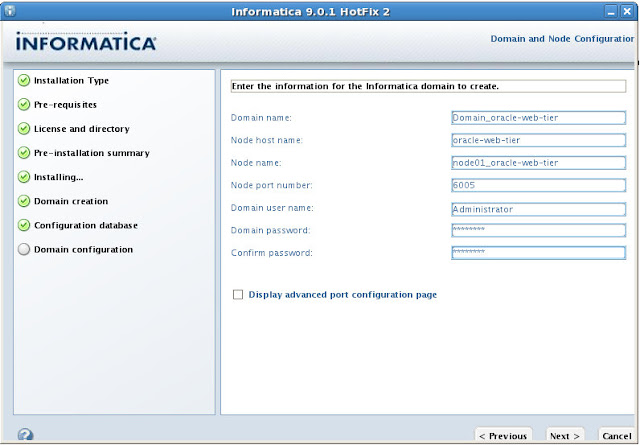
Informatica Domain. I'm going to accept the defaults:


Summary
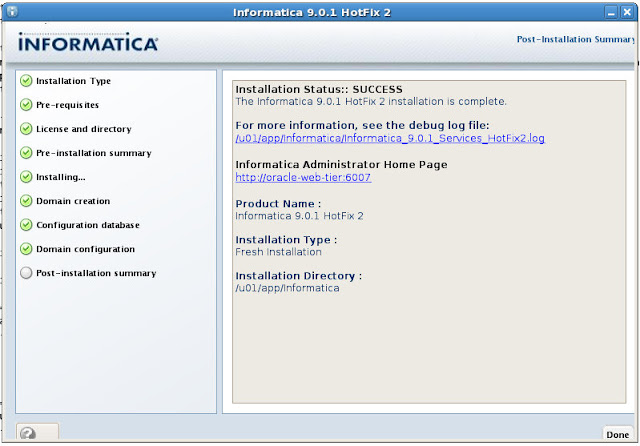

===============================================================================
Configuring Installation...
---------------------------

 [==================|==================|==================|==================]
 [------------------|------------------|------------------|------------------]

Installation Complete.
To verify your installation, open up http://localhost:6007/administrator/, username is administrator and the password is the one you supplied during installation.
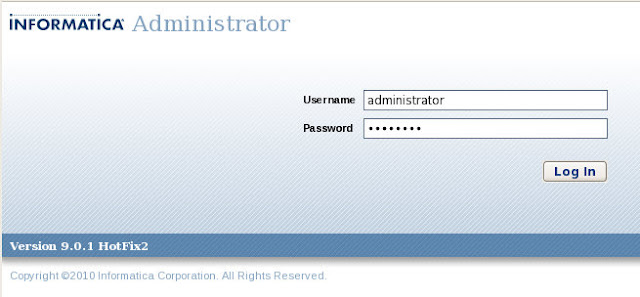


You'll be redirected to this page.
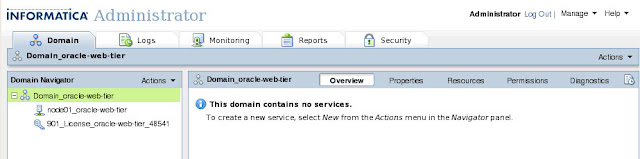


Next steps will be to cover the Information Repository Service and Informatica Integration Service. That of couse, is later.

Wednesday, September 7, 2011

OEL: Add More Disk(s)

Many of you know I'm still relatively new to non-Windows platforms. I've been running Ubuntu (from 9.04 > 11.04) at home for a few years now though, in an effort to better understand what I am doing when I don't have to just point-and-click. Fortunately for me, Ubuntu has a pretty slick UI so it's not all done at the command line.

During that same time, I've taken to using Oracle Enterprise Linux for all my software installs, from the database (11gR1 > 11gR2), OBIEE (10.1.3.4 > 11.1.1.5), Informatica components, so on and so forth. I can say with all honesty now, that I would prefer a nix install over a Windows 2008 Server install (security being the biggest issue I have, not that it's bad, I have no idea...let's just say I find it annoying that if I can install the software, I should have access to the directories...which apparently I don't).

All of my testing is done with VirtualBox. For my XP virtual machines, I've gotten to the point where I simply clone an existing "base" VDI and use that (for clients mostly, and some OBIEE software).

Often times I'll allocate n GBs of space. Occasionally, like with my first few attempts with OBIEE, I don't allocate enough space. For me, that means recreating the entire VM with n + x number of GBs. Silly, I know.

I don't have to do that any longer, I finally learned how to add space without starting from scratch. Yay for me.

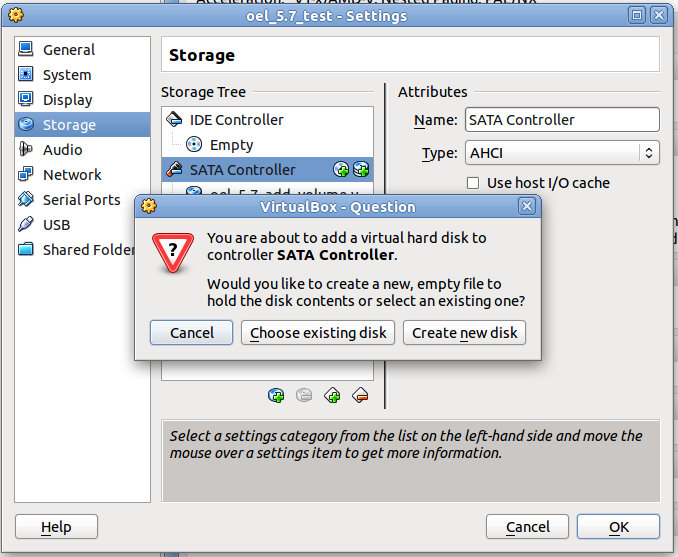
First up, I go into the settings of the VM (while stopped, of course) and add a new SATA controller. I select Create new disk.


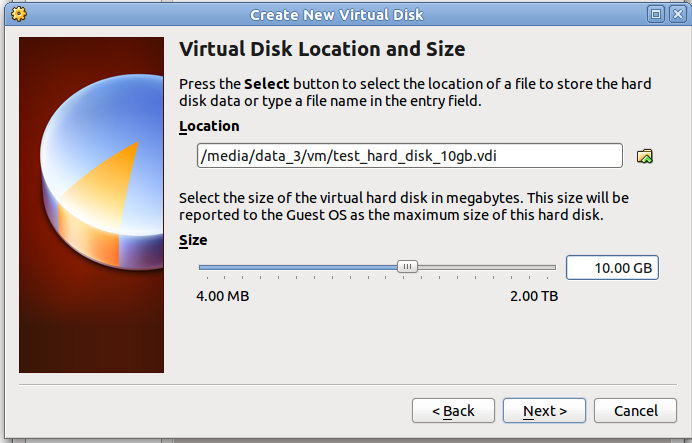
Please ignore the "10" GBs part, I had taken those screenshots last week. I'm actually adding 100 GBs for the remainder of this exercise. I choose a location, name it and give it a size in GBs.


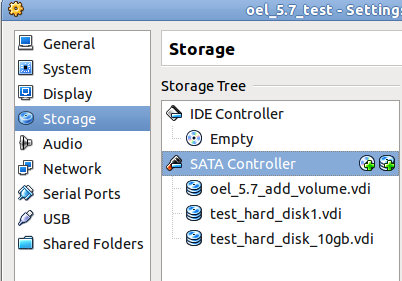
Now you can see (forget the 10, it's 100) it listed in the Storage section of the VM Settings


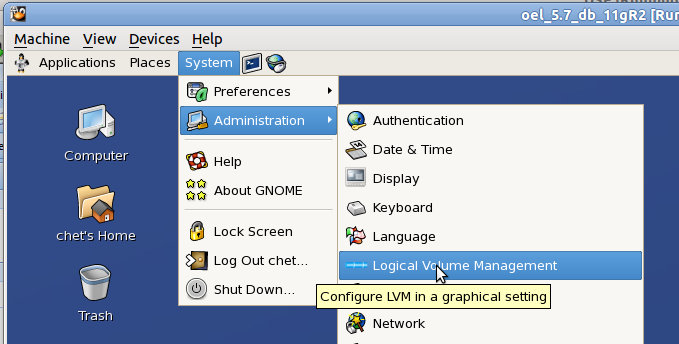
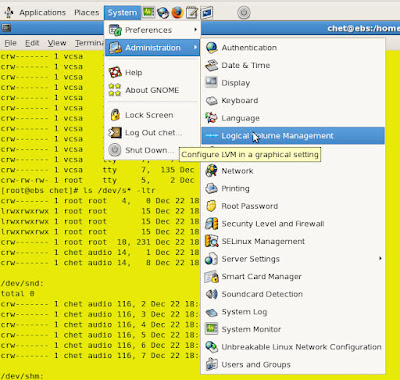
So now I fire up my VM (OEL 5.7), go to System > Administration > Logical Volume Managment. You'll be prompted for the root password.


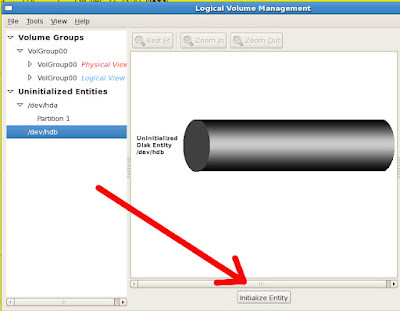
Under the Uninitialized Entities, you should see the disk you just added. Select Initialize Entry.

3

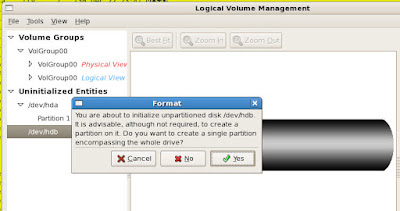
Blah blah blah. Yes.


Blah blah blah. Yes.


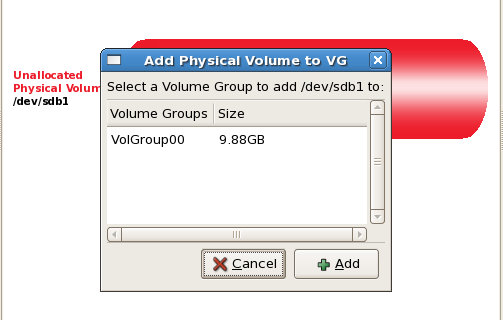
Now it's migraterd up to your Unallocated Volumes section. Add to existing Volume Group.


You should be prompted with your currently existing Volume Group, in my case, VolGroup00. Select it and then click Add.


Here's a picture of what I have allocated so far, 4.8 GiB (the rest is swap space)


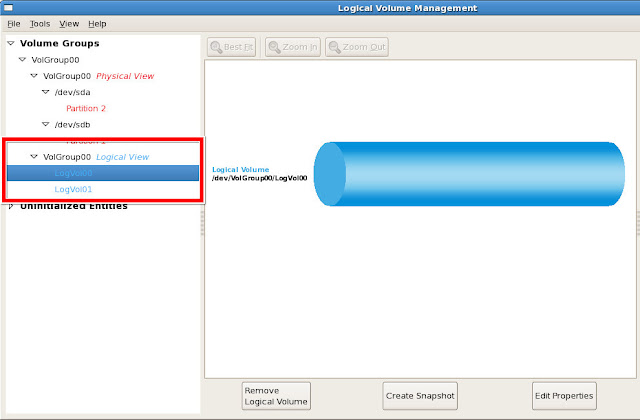
Now, under VolGroup00 (Logical View), select Edit Properties


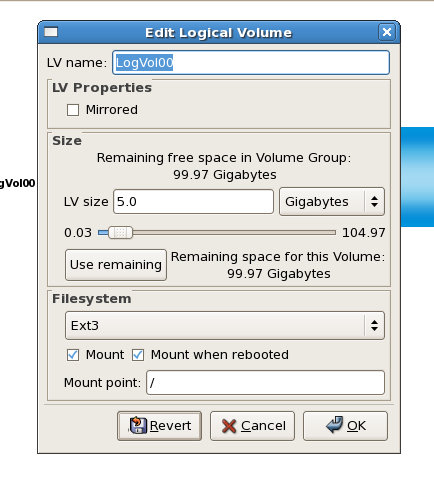
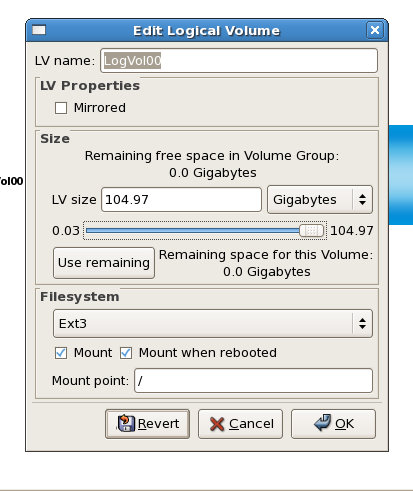
You'll be prompted with the Edit Logical Volume dialog. On the slider, you can see that it goes up to 104.97 and just below that a, "Use remaining space for this volume: 99.97 Gigabytes"


You can choose either one.


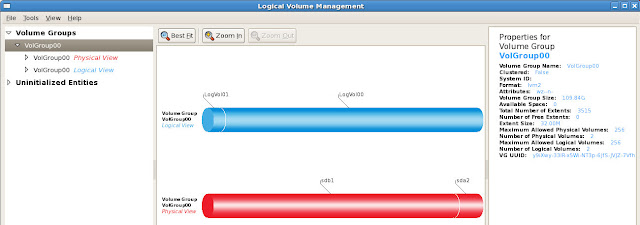
Now you can usee that VolGroup00 has 2 physical volumes which comprise it, sda2 and sdb1, sdb1 is the one I've just added. To the right, you can see the Volume Group Size is now 109.84.


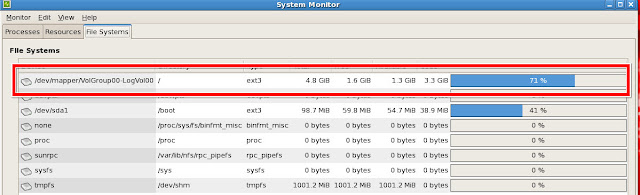
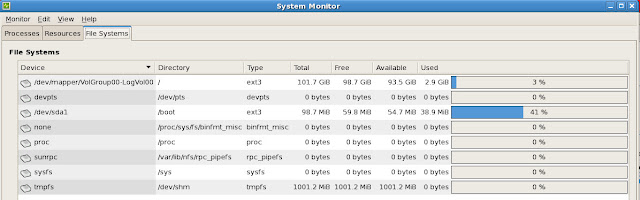
And finally, System Monitor shows that I now have a total of 101.7 GiBs associated with VolGroup00-LogVol00


It's as simple as that.

Someday I'll figure out how to add different disks (well, technically they are different disks, just logically only 1) so that I can layout my tablespaces a bit better. For now though, no more recreating virtual machines just because I didn't plan well enough.

Tuesday, March 29, 2011

OEL 6 + VirtualBox Guest Additions

I'm taking my first second spin at Oracle Enterprise Linux 6. The first time, I did not install a Desktop, so I was completely lost. I suppose I could do it now...but, I'm not going there just yet.

One of the very first things I do when creating a VM is install the Guest Additions. The main reason is screen size. Out-of-the-box, it's 800x600 or some such non-sense. I'm sure I could cope, if I had to, I'd rather not, it's just annoying. I guess a little perspective is in order:


That's against the backdrop of a 23" monitor. So yeah, annoying.

After having done this about 20 times, I know you need to install some extra packages. Usually the kernel* and make packages. I'll just skip straight to installing the Guest Additions though, let's see what happens.
Nothing to see here.
Well, Guest Additions includes the bi-directional clipboard support, and I'm not in the mood to type up the entire thing. Here's the specific error I received however (typed by hand, you are welcome):
Building the VirtualBox Guest Additions kernel modules
The headers for the current running kernel were not found. If the following
module compilation fails then this could be the reason.
The missing package can be probably [sic] installed with
yum install kernel-devel-2.6.32-100.28.5.el6.x86_64
The output of the log file shows this:
[root@oel6test VBOXADDITIONS_4.0.4_70112]# tail /var/log/vboxadd-install.log -n 100
Makefile:23: *** Error: unable to find the sources of your current Linux kernel.
Specify KERN_DIR= and run Make again.. Stop.
OK, let's try that. The Google Machine told me the kernel lives in /usr/src/kernels/
[root@oel6test VBOXADDITIONS_4.0.4_70112]# export KERN_DIR=/usr/src/kernels/
Run the command again and it tells me that "KERN_DIR does not point to a directory. Stop." No you stop. Whatever.

I then go into the "additional" packages provided by the OEL6 DVD. Funny, now that I look at the kernel* packages, I wonder if they are outdated? uname -r shows me 2.6.32-100.28.5.el6.x86_64 which I believe is correct, but the kernel* packages on the disk look to be in the 2.6.32-71 range. Weird, since I seem to have the latest...

Now, it's time for some public yum, Oracle's public yum server to be exact. Awesome, instructions on the front page on how to set it up, makes it somewhat foolproof for someone like me:

Download and copy the appropriate yum configuration file in place, by running the following commands as root:

Oracle Linux 4, Update 6 or Newer

# cd /etc/yum.repos.d
# mv Oracle-Base.repo Oracle-Base.repo.disabled
# wget http://public-yum.oracle.com/public-yum-el4.repo
Oracle Linux 5

# cd /etc/yum.repos.d
# wget http://public-yum.oracle.com/public-yum-el5.repo
Oracle Linux 6

# cd /etc/yum.repos.d
# wget http://public-yum.oracle.com/public-yum-ol6.repo
Oracle VM 2

# cd /etc/yum.repos.d
# wget http://public-yum.oracle.com/public-yum-ovm2.repo
Enable the appropriate repository by editing the yum configuration file

Open the yum configuration file in a text editor
Locate the section in the file for the repository you plan to update from, e.g. [el4_u6_base]
Change enabled=0 to enabled=1
Begin using yum, for example:

yum list

yum install firefox

And here is where I cheat, sort of. Instead of just using yum, I go to the Add/Remove Software GUI.


Wait just a second...those "%100%" packages have "uek" in them, I thought that was for the Unbreakable Enterprise Kernel. Did I install that? I thought I opted out of that...

So back to the DVD and there are those packages sitting there, of the "uek*100*" variety. Let's install those.
kernel-uek-2.6.32-100.28.5.el6.x86_64.rpm
kernel-uek-debug-2.6.32-100.28.5.el6.x86_64.rpm
kernel-uek-debug-devel-2.6.32-100.28.5.el6.x86_64.rpm
kernel-uek-devel-2.6.32-100.28.5.el6.x86_64.rpm
kernel-uek-doc-2.6.32-100.28.5.el6.noarch.rpm
kernel-uek-firmware-2.6.32-100.28.5.el6.noarch.rpm
kernel-uek-headers-2.6.32-100.28.5.el6.x86_64.rpm
I install the debug, the debug-devel, devel and headers. Reboot.

No joy. But I can see that it can't find the gcc command, so I just have to load that package. Of course it isn't that easy, it has dependencies.
[root@oel6test Packages]# rpm -ivh gcc-4.4.4-13.el6.x86_64.rpm 
warning: gcc-4.4.4-13.el6.x86_64.rpm: Header V3 RSA/SHA256 Signature, key ID ec551f03: NOKEY
error: Failed dependencies:
cloog-ppl >= 0.15 is needed by gcc-4.4.4-13.el6.x86_64
cpp = 4.4.4-13.el6 is needed by gcc-4.4.4-13.el6.x86_64
First up:
[root@oel6test Packages]# rpm -ivh glibc-headers-2.12-1.7.el6.x86_64.rpm 
warning: glibc-headers-2.12-1.7.el6.x86_64.rpm: Header V3 RSA/SHA256 Signature, key ID ec551f03: NOKEY
Preparing... ########################################### [100%]
1:glibc-headers ########################################### [100%]
Now I can load the devel files for glibc.
[root@oel6test Packages]# rpm -ivh glibc-devel-2.12-1.7.el6.x86_64.rpm 
warning: glibc-devel-2.12-1.7.el6.x86_64.rpm: Header V3 RSA/SHA256 Signature, key ID ec551f03: NOKEY
Preparing... ########################################### [100%]
1:glibc-devel ########################################### [100%]
What else?
[root@oel6test Packages]# rpm -ivh cpp-4.4.4-13.el6.x86_64.rpm 
warning: cpp-4.4.4-13.el6.x86_64.rpm: Header V3 RSA/SHA256 Signature, key ID ec551f03: NOKEY
error: Failed dependencies:
libmpfr.so.1()(64bit) is needed by cpp-4.4.4-13.el6.x86_64
Seriously. Since this isn't the first time today, I know what package that so file is from.
[root@oel6test Packages]# rpm -ivh mpfr-2.4.1-6.el6.x86_64.rpm 
warning: mpfr-2.4.1-6.el6.x86_64.rpm: Header V3 RSA/SHA256 Signature, key ID ec551f03: NOKEY
Preparing... ########################################### [100%]
1:mpfr ########################################### [100%]
Now cloog-ppl.
[root@oel6test Packages]# rpm -ivh cloog-ppl-0.15.7-1.2.el6.x86_64.rpm 
warning: cloog-ppl-0.15.7-1.2.el6.x86_64.rpm: Header V3 RSA/SHA256 Signature, key ID ec551f03: NOKEY
error: Failed dependencies:
libppl.so.7()(64bit) is needed by cloog-ppl-0.15.7-1.2.el6.x86_64
libppl_c.so.2()(64bit) is needed by cloog-ppl-0.15.7-1.2.el6.x86_64
What about a ppl* package?
[root@oel6test Packages]# rpm -ivh ppl-0.10.2-11.el6.x86_64.rpm 
warning: ppl-0.10.2-11.el6.x86_64.rpm: Header V3 RSA/SHA256 Signature, key ID ec551f03: NOKEY
Preparing... ########################################### [100%]
1:ppl ########################################### [100%]
Almost there. Back to cloog.
[root@oel6test Packages]# rpm -ivh cloog-ppl-0.15.7-1.2.el6.x86_64.rpm 
warning: cloog-ppl-0.15.7-1.2.el6.x86_64.rpm: Header V3 RSA/SHA256 Signature, key ID ec551f03: NOKEY
Preparing... ########################################### [100%]
1:cloog-ppl ########################################### [100%]
cpp
[root@oel6test Packages]# rpm -ivh cpp-4.4.4-13.el6.x86_64.rpm 
warning: cpp-4.4.4-13.el6.x86_64.rpm: Header V3 RSA/SHA256 Signature, key ID ec551f03: NOKEY
Preparing... ########################################### [100%]
1:cpp ########################################### [100%]
gcc?
[root@oel6test Packages]# rpm -ivh gcc-4.4.4-13.el6.x86_64.rpm 
warning: gcc-4.4.4-13.el6.x86_64.rpm: Header V3 RSA/SHA256 Signature, key ID ec551f03: NOKEY
Preparing... ########################################### [100%]
1:gcc ########################################### [100%]
Yes!

It's working...

Sweet!
[root@oel6test VBOXADDITIONS_4.0.4_70112]# /bin/bash ./VBoxLinuxAdditions.run install
Verifying archive integrity... All good.
Uncompressing VirtualBox 4.0.4 Guest Additions for Linux.........
VirtualBox Guest Additions installer
Removing installed version 4.0.4 of VirtualBox Guest Additions...
Removing existing VirtualBox DKMS kernel modules [ OK ]
Removing existing VirtualBox non-DKMS kernel modules [ OK ]
Building the VirtualBox Guest Additions kernel modules
Your guest system does not seem to have sufficient OpenGL support to enable
accelerated 3D effects (this requires Linux 2.6.27 or later in the guest
system). This Guest Additions feature will be disabled.


Building the main Guest Additions module [ OK ]
Building the shared folder support module [ OK ]
Doing non-kernel setup of the Guest Additions [ OK ]
Starting the VirtualBox Guest Additions [ OK ]
Installing the Window System drivers
Installing X.Org Server 1.7 modules [ OK ]
Setting up the Window System to use the Guest Additions [ OK ]
You may need to restart the hal service and the Window System (or just restart
the guest system) to enable the Guest Additions.

Installing graphics libraries and desktop services componen[ OK ]
Reboot (or just restart your X-windows.


Voila!

Update: 03/30/2011 20:50:00 EST
Thanks to Robin Moffat [blog|@rnm1978] for providing a much simpler solution:
yum install kernel* dkms gcc
Reboot after that and install your Guest Additions. No more having to figure out the dependencies on your own (I'll leave it to you to decide whether that is a good exercise or not).

Update: 02/14/2013 12:00:00 EST
One more addition from Mr. Closson (comments, below).
# yum install kernel-uek-devel 

Thursday, March 3, 2011

VirtualBox and Shared Folders

I have had problems with Shared Folders in the past, read here and here, for just 2 examples.

For my latest project, I decided to skip Shared Folders altogether and just FTP my files to the VM and then load them from a Directory (object). I started to use Telnet and FTP, but was quickly shamed into using ssh and SFTP. Mostly though, I think I was just lazy initially, or time-crunched, or whatever. I didn't want to bother.

I discovered some new functionality today which means I have to share.

Previously, you had to mount the Shared Folders manually, via something along the lines of:
[root@medicaid oracle]# mount -t vboxsf files oracleFiles
That worked like a charm, or so I thought. I started the process to load files and received an Oracle error (something about couldn't write the log file).
[root@medicaid oracle]# ls -la /u01/app
total 24
drwxrwxr-x 6 oracle oinstall 4096 Mar 3 12:46 .
drwxrwxr-x 3 oracle oinstall 4096 Feb 23 15:32 ..
drwxr-xr-x 8 oracle oinstall 4096 Feb 23 17:14 oracle
drwxr-xr-x 2 oracle dba 4096 Mar 3 12:52 oracleDirectory
drwxr-xr-x 1 root root 4096 Mar 3 16:51 oracleFiles
drwxrwx--- 5 oracle oinstall 4096 Feb 23 16:48 oraInventory
OK, let's change that.
[root@medicaid oracle]# chown oracle:dba -R /u01/app/oracleFiles
No errors.
[root@medicaid oracle]# ls -la /u01/app
total 24
drwxrwxr-x 6 oracle oinstall 4096 Mar 3 12:46 .
drwxrwxr-x 3 oracle oinstall 4096 Feb 23 15:32 ..
drwxr-xr-x 8 oracle oinstall 4096 Feb 23 17:14 oracle
drwxr-xr-x 2 oracle dba 4096 Mar 3 12:52 oracleDirectory
drwxr-xr-x 1 root root 4096 Mar 3 16:51 oracleFiles
drwxrwx--- 5 oracle oinstall 4096 Feb 23 16:48 oraInventory
WTF? Tried it again (yes, I know the definition of insanity). No joy.

What's this, a help button? Let's see what it says. From the docs:

Starting with version 4.0, VirtualBox can mount shared folders automatically, at your option. If automatic mounting is enabled for a specific shared folder, the Guest Additions will automatically mount that folder as soon as a user logs into the guest OS. The details depend on the guest OS type:

With Windows guests, any auto-mounted shared folder will receive its own drive letter (e.g. E:) depending on the free drive letters remaining in the guest.

If there no free drive letters left, auto-mounting will fail; as a result, the number of auto-mounted shared folders is typically limited to 22 or less with Windows guests.

With Linux guests, auto-mounted shared folders are mounted into the /media directory, along with the prefix sf_. For example, the shared folder myfiles would be mounted to /media/sf_myfiles on Linux and /mnt/sf_myfiles on Solaris.

The guest property /VirtualBox/GuestAdd/SharedFolders/MountPrefix determines the prefix that is used. Change that guest property to a value other than "sf" to change that prefix; see the section called “Guest properties” for details.

Ah, there it is. Neat.
[oracle@medicaid]$ ls -la /media/sf_files
Permission denied
Oh, a note:

Note
Access to auto-mounted shared folders is only granted to the user group vboxsf, which is created by the VirtualBox Guest Additions installer. Hence guest users have to be member of that group to have read/write access or to have read-only access in case the folder is not mapped writable.

That helps.

Based on some feedback in the comments, I am not 100% sure the following command (usermod) is accurate. Until I can research this, please see the comments.
[root@medicaid oracle]#/usr/sbin/usermod -G vboxsf oracle
Exit out of root, still no joy. Issued the id command, and there is my group listed...So what did an ex-Windows user do? Reboot.

That worked. I now have access to these super cool auto-mounted Shared Folders. Thanks VirtualBox!

Monday, February 28, 2011

OEL 5.6: Enable Telnet and FTP

Since I "broke" my last installation and couldn't easily get the latest and greatest Oracle Enterprise Linux running correctly (1, forgot the Desktop components, 2, I can't remember), I went back to OEL 5.6 (Carthage).

I have about 100 files that I need to move over to that server and with my issues with VirtualBox Shared folders in the past, I figured I would just FTP them. Well, FTP isn't on by default...and since this is a sandbox, I don't much care about "real" authorization.

FTP
For FTP, go into /etc/xinited.d/ and open up gssftp
[root@medicaid xinetd.d]# vi gssftp 

# default: off
# description: The kerberized FTP server accepts FTP connections \
# that can be authenticated with Kerberos 5.
service ftp
{
flags = REUSE
socket_type = stream
wait = no
user = root
server = /usr/kerberos/sbin/ftpd
server_args = -l -a
log_on_failure += USERID
disable = yes
}
By default, it is disabled.

To enable it, change disable = yes to disable = no. That's not it though. If you try to ftp in, you'll see this:
oraclenerd@oraclenerd:/usr/bin$ ftp medicaid
Connected to medicaid.
220 medicaid FTP server (Version 5.60) ready.
Name (medicaid:oraclenerd): oracle
530 Must perform authentication before identifying USER.
Login failed.
Remote system type is UNIX.
Using binary mode to transfer files.
ftp> quit
221 Goodbye.
With the help of this discussion, I removed the server arguments. From what I can tell, those are there for Kerberos authentication, which I don't need or care about. Your final file should look like this:
service ftp
{
flags = REUSE
socket_type = stream
wait = no
user = root
server = /usr/kerberos/sbin/ftpd
server_args =
log_on_failure += USERID
disable = no
}
Then you can do this:
oraclenerd@oraclenerd:/usr/bin$ ftp medicaid
Connected to medicaid.
220 medicaid FTP server (Version 5.60) ready.
Name (medicaid:oraclenerd): oracle
331 Password required for oracle.
Password:
230 User oracle logged in.
Remote system type is UNIX.
Using binary mode to transfer files.
ftp> quit
221 Goodbye.
Telnet
The process is nearly identical for telnet, here's the config file:
service ftp
{
flags = REUSE
socket_type = stream
wait = no
user = root
server = /usr/kerberos/sbin/ftpd
server_args =
log_on_failure += USERID
disable = yes
}
For telnet, just change disabled=yes to disabled=no.
oraclenerd@oraclenerd:/usr/bin$ telnet medicaid
Trying 192.168.1.6...
Connected to medicaid.
Escape character is '^]'.

medicaid (Linux release 2.6.18-194.el5 #1 SMP Mon Mar 29 22:10:29 EDT 2010) (2)

login: oracle
Password:
Last login: Mon Feb 28 14:38:06 on :0
[oracle@medicaid ~]$
Next time, I won't have to remember, or I'll have blown away so many instances that I'll just remember, either way, this is my record.

Update
So, twitter gave me the following after I posted the link to this post:


My answer, How in the f would I know something like this? I have no fancy training. :)

So, now I'm using ssh and sftp. Much easier, and it just seems to work. No configuration necessary. Yeah for Mr. Norris.

Saturday, December 26, 2009

VirtualBox: Add Second HDD

Two weeks ago I found a 1 TB external drive for $100, couldn't pass it up. Space was the biggest obstacle in following along in John's EBS series (part IV coming soon).

I had purchased a "small" 320 GB HDD about a month ago, but that effort proved futile because I started to save everything off to that after I upgraded to Karmic Koala and received this lovely message:


Finally, I could install EBS without worrying about space...I created a Dynamically Expanding HDD of 300 GB. I then installed Oracle Enterprise Linux (OEL) 5, Update 4 and loaded as many of the known libraries that I could. Then I began downloaded and unzipping all of the required files. I was doing this in parallel, download the file, unzip, remove the zip file. After about 8 total hours, it was done. The VDI had grown to 68.5 GB.

I then ran the rapidwiz.sh script, navigated through the screens until I got through to the system check. It complained I didn't have enough disk space to install. Of course not...there was only 231.5 GB of space left.

Stupidity followed.

What were my options?

OK, I could extend that VDI to 350 GB...VirtualBox doesn't allow that yet.

But for some reason I couldn't just keep that dynamically expanding VDI, I had to shrink it. How?

zerofree

That would allow me to first zero out the unused space and then use VBoxManage compacthd to shrink it.

That required greater skills than I had though. First of all, you had to mount the root file system in read-only mode. I tried a bunch of different ways and could never get it to work. Looking back, it might be easy(er)...

I then decided to clone the VDI with VBoxManage clonehd thinking (and therein lies the problem) that would do the trick. 12 hours later, I had the cloned VDI. Added it to the Virtual Media Manager but it is just an exact copy of the other one (68.5 used, 300 GB total). Doh.

Enough of this. I'll just add a 350 HD as a Dynamically Expanding primary slave. So I did, booted up OEL and...where is it? Why can't I find it? I guess I have to mount it right?

Instead of researching first, I just start to muck around with the system. Really long story short, I thought it wise to edit /etc/fstab. Upon reboot, it broke. (Shocker)

Amusingly, the root file system was mounted as read-only so I could finally run zerofree.

OK, so I mucked up /etc/fstab, I can fix that right? Just replace my edits with the original...wait, it's a read-only file system.

Twitter to the rescue for the umpteenth time.

Twitter Question from ORACLENERD

Some back and forth with @brad_tumy before finally going to IM.

He pointed me to this link and this command
mount -w -o remount /
Worked! I could now edit the file and get my system back up and running.

"Um, Brad, while I have you..."
Do you know how to add a second HDD using VirtualBox? (Yes, I'm really sneaky).

He then pointed me to this link written by the esteemed Mr. Topper. It was kind of hard for me to believe at first, I am not sure I have read a "live" post by Mr. Topper in quite some time. Ah yes, the last post was June 5, 2008.

Brad: "Check out step 12, that's where you should start."

OK, step 12, Create the Partition. This is a VMWare guide, but the concepts are the same. I'm really not sure, but I opened up the Logical Volume Manager (LVM)

Opening the Logical Volume Manager

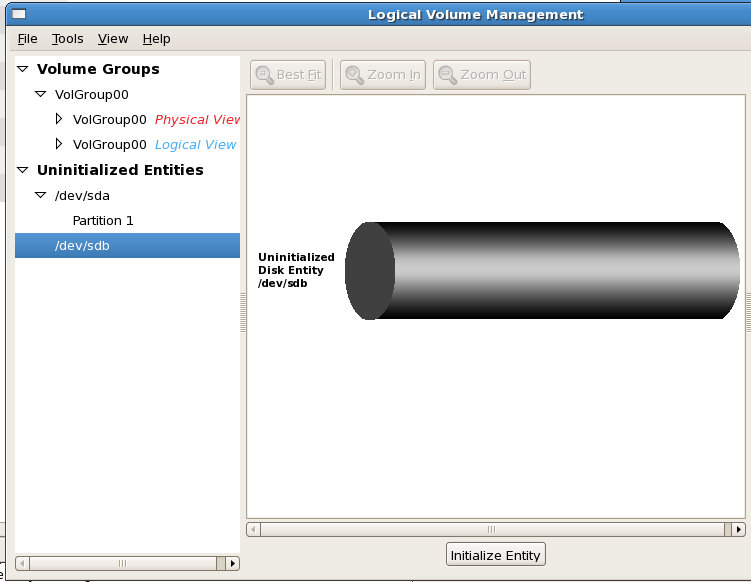
Which opened up this. What's this "Uninitialized Entities" section? I haven't seen that before.


I think I'll click on it.

That looks like my second HDD. Initialize Entity? Sure, why not?

LVM - Initialize Entity

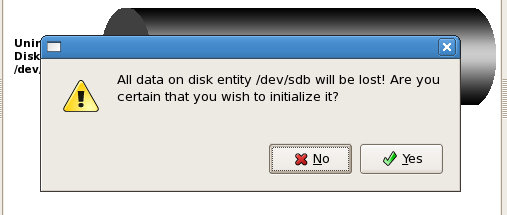
Are you sure you want to initialize this entity? Everything on there will be lost!

LVM - Are you sure?

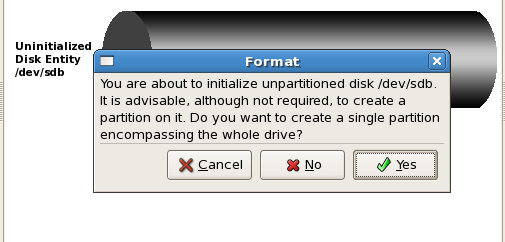
Do you want to create a single partition? Are you sure about that?

LVM - Single partition?  Positive?

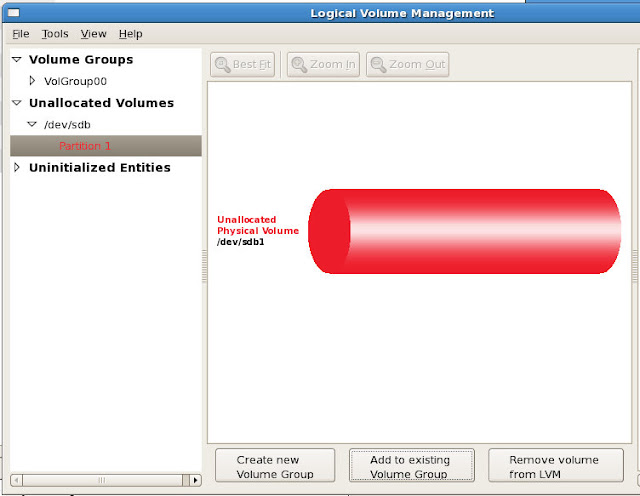
OK, that's done. Now it appears iin the Unallocated Volumes section. Let's create a new Volume Group.

LVM - Create new Volume Group

I named it VolumeEBS, I suppose you can name it whatever you want.

LVM - Volume Group - VolumeEBS

Done.

Almost.

How in the hell do I mount this thing?

(Brad is long gone now...we chatted for over an hour into the wee hours of the morning...I can't blame him. He was probably trying to escape after that second question).

Back to Matt's post. Honestly, I have no idea (yet) if this is the same command I performed via the GUI, but I did it anyway after a couple of unsuccessful attempts at mounting the drive.
[root@ebs chet]# /sbin/mkfs -t ext3 /dev/hdb1
mke2fs 1.39 (29-May-2006)
Filesystem label=
OS type: Linux
Block size=4096 (log=2)
Fragment size=4096 (log=2)
39321600 inodes, 78643199 blocks
3932159 blocks (5.00%) reserved for the super user
First data block=0
Maximum filesystem blocks=0
2400 block groups
32768 blocks per group, 32768 fragments per group
16384 inodes per group
Superblock backups stored on blocks:
32768, 98304, 163840, 229376, 294912, 819200, 884736, 1605632, 2654208,
4096000, 7962624, 11239424, 20480000, 23887872, 71663616

Writing inode tables: done
Creating journal (32768 blocks): done
Writing superblocks and filesystem accounting information: done

This filesystem will be automatically checked every 39 mounts or
180 days, whichever comes first. Use tune2fs -c or -i to override.
Something good happened...I think.
[root@ebs chet]# mount -t ext3 /dev/hdb1 /install
[root@ebs chet]# ls /install
lost+found
Win! Or is that FAIL!? I don't care. It's done.

I added the line (correctly this time) to /etc/fstab, rebooted and it's there.

Now, finally (finally), I can begin my install of EBS. The latest version has probably been released and the instructions are probably moot, but I managed something.

Friday, December 11, 2009

OEL, OBIEE, VirtualBox and Shared Folders

I spent the week installing OBIEE in Windows (Vista Ultimate) and OEL 5, Update 4. I've always tried to install the software I'm working with, it helps to give me a better understanding of what's going on. I don't always understand at first, but after prolonged exposure, I can more easily put the pieces together.

Digression
I can remember trying to install OAS on a Windows server back in 2002, multiple times. I had absolutely no idea what I was doing...just clicking buttons and stuff. In particular, there was the was this one night...err, morning, 4 AM to be exact where I was installing the software for what felt like the 200th time. Did I mention I was onsite...and in the server room? The only reason I remember that particular time was the justification I was using...LC was T minus 1 week.

Post
In the OEL/OBIEE article, I mentioned some problems that I had, those problems are the reason for this post.

I'll recall the setup:
Guest
Oracle Enterprise Linux 5, Update 4
Oracle Business Intelligence Enterprise Edition, 10.1.3.4
Java 6 (1.6_0.17)
Memory: 1280M
Diskspace: 30 GB

Host
Ubuntu 9.04
VirtualBox 3.0.10
--VirtualBox Guest Addtions (i.e. Shared Folders)
Dell XPS M1530
3 GB RAM
150 GB Hard Drive
I believe that's all that is relevant. If I left something off, let me know and I'll add it in.

This is a fresh install of OEL. After installation of the OS, I installed the Guest Additions so I could 1, get a higher screen resolution and 2, I could use Shared Folders.

From the host, I unzipped the OBIEE software into /opt/software/oracle/obiee/linux, I then un-tarred (?) the resultant .tar file.

From the guest, I logged in as root and issued:
mount -t vboxsf software /mnt/software
* You can see the full set of instructions on the Shared Folder post

I then navigated to the directory via the mounted path
/mnt/software/oracle/obiee/linux/RH_Linux/Server/Oracle_Business_Intelligence
From there I followed the instructions.
[oracle@localhost Oracle_Business_Intelligence]$ ./setup.sh -console
InstallShield Wizard

Initializing InstallShield Wizard...

Preparing Java(tm) Virtual Machine...
...................................
...................................
...................................
...................................
...................................
...................................
...................................
...................................
...................................
...................................
...................................
...................................
...................................
...................................
...................................
...................................
...................................
...................................
...................................
...................................
...................................
............
It would just hang there. For the longest time.

I poured over the documentation to see if I missed a required library or something. Nothing. I ran and reran the UnixChk.sh script multiple times (the script checks to see if OBIEE can be installed and outputs SUCCESS or FAILURE). I would start and stop this installation over and over. Going so far as to let it run overnight (which for me is about 5 hours).

I could get past this part, given sufficient time, typically down to the point where it is actually writing the software to disk (presumably anyway).
Installing $L(com.siebel.analytics.install.AnyStringConstants,
InstallConfig.ProductName) $P(SiebelAnalyticsProductBean.productNumber). Please
wait...


|-----------|-----------|-----------|------------|
0% 25% 50% 75% 100%
|||||||||||||||||||||||||||||||||||||||||||||||||||

Installing Oracle Business Intelligence 10.1.3.4.1. Please wait...
||||||||||||||||||||
Again, it would just sit there.

Finally, on Wednesday evening I saw a friend of mine (Tom Roach, former President of SOUG) online (or did he see me?). Anyway, I told him about the situation and, since he expressed interest in my problem, I offered to show him.

We then spent the next 30 minutes trying to get him access to my computer. Suffice it to say, I can do that easily on Windows. Ultimately, he talked me through enabling SSH and he was in.

That's when the magic began.

As I watched him type up all these commands, looking through scripts...and starting and stopping the installation. I had my own personal (*nix) trainer. First, I believe he ran
[oracle@localhost Oracle_Business_Intelligence]$sh -x ./setup.sh -console
Which then output all kinds of stuff I didn't recognize. I asked him later what it was, the sh command let's you debug the shell script to get a better idea of what is going on. When he killed it, I noticed an error, "'run' class cannot be found" or something along those lines. Before Tom showed up, I had suspected there was something going on with my Java environment. I tried using jcontrol to change the memory allocated to Java upon start with no luck. I began installation, then ran jconsole to see what was going on with the JVM. I saw "things" that must have been the problem...none of this proved out in the end. In fact, I think I told Tom that originally, that I suspected that the Java environment wasn't set up correctly.

He then noticed that it was calling Linux.jar in the same directory. So he ran that directly (to eliminate a possible error in the main script I'm guessing):
[oracle@localhost Oracle_Business_Intelligence]$exec Linux.jar -console
or something very close to that.

Occasionally he'd run this "history" command. Wow! You can see all the commands you've entered. That's helpful.

Next up he tried to run "strace." "File or directory not found" Tom, prefix it with /sbin or /bin. No go. It's not installed. I then began to look for it on 1 of the 4 ISO images. Found it and loaded it.

ENTER STRACE COMMAND

He then began to pour through the when he notices lines like this:
wait4(5171, 0xbfa23aac, WNOHANG|WSTOPPED, NULL) = 0
read(3, 0x8a39cd0, 4096) = -1 EAGAIN (Resource temporarily unavailable)
read(5, 0x8a39cd0, 4096) = -1 EAGAIN (Resource temporarily unavailable)
nanosleep({0, 10000000}, NULL) = 0
wait4(5171, 0xbfa23aac, WNOHANG|WSTOPPED, NULL) = 0
read(3, 0x8a39cd0, 4096) = -1 EAGAIN (Resource temporarily unavailable)
read(5, 0x8a39cd0, 4096) = -1 EAGAIN (Resource temporarily unavailable)
nanosleep({0, 10000000}, NULL) = 0
wait4(5171, 0xbfa23aac, WNOHANG|WSTOPPED, NULL) = 0
read(3, 0x8a39cd0, 4096) = -1 EAGAIN (Resource temporarily unavailable)
read(5, 0x8a39cd0, 4096) = -1 EAGAIN (Resource temporarily unavailable)
nanosleep({0, 10000000}, 0) = ? ERESTART_RESTARTBLOCK (To be restarted)
Googled those, but I believe he had his suspicions. He also found the following useful, but I'm not sure why. I think he mentioned something about the fork() and trying to change directories but being unable to.
getcwd("/home/oracle"..., 1024)         = 13
chdir("/mnt/software/.../Oracle_Business_Intelligence") = 0
pipe([3, 4]) = 0
pipe([5, 6]) = 0
fork() = 5171
chdir("/home/oracle") = 0
close(4) = 0
close(6) = 0
fcntl64(3, F_GETFL) = 0 (flags O_RDONLY)
If I can't recall very clearly it's because we started this IM at about 11:30 PM EST. It was now approaching 1 AM.

Based on what he said and the problems Jake had previously, I began to seriously think it might have something to do with the Shared Folders. I wondered aloud on IM, "Could this be due to the Shared Folders and the OS's inability to write there?" Tom, "Perhaps"

I asked if I should just move the software to the OS and run it from there.

By then Tom was giving me a great tutorial on screen.

Tom didn't get to installing the software successfully, but he gave me sh, screen, history, and strace. By reviewing the output with him and explaining what I was trying to do, Tom got me going in the right direction.

After 2 hours, now 1:30 AM, Tom finally succombed. That was pure awesome...thanks again Tom for your help!

I wasn't ready for sleep yet (besides being a bit of an insomniac), I had new life.

First copied the files over to the guest OS. Ran the UnixChk.sh script then ran the setup.sh script. After about a minute, I was prompted for my first response. Sweet! I answered all the questions and went down to watch TV for an hour or so. I came back, answered a few more questions and it was done.

Only to be destroyed later that morning and re-installed.

Tuesday, December 8, 2009

OEL, VirtualBox and Shared Folders

Inspired by Jake's difficulty with getting Virtual Box's Shared Folders to work with Oracle Enterprise Linux (OEL), I'm writing it up...I'm sure he's not the only one with problems.

Most awesomely, he had members of the Sun VirtualBox team commenting on his post.

It's funny, I just got this working a couple of weeks ago. I would typically go his route, get the guest machine working and then download the software from there. Since I have limited space, I tend to create smaller VMs, usually around 10GB or 15GB for database servers. These are sandboxes, a way for me to learn certain aspects of the database (as well as installation).

So here we go. I'm assuming you have your VM running. First, go to Devices:


Next, choose Shared Folders


You should then see this window


Click on the little icon in the top right corner


You'll then be asked to choose a directory (on your host machine)


I chose /opt/software


Name it something you'll remember, like "software" and check the "Make Permanent" check box:


Back to the Shared Folder screen and it should look like this


Go ahead and select "Ok"

Now, open up a terminal and login as root:
[oracle@localhost ~]$ su root
Password:
[root@localhost oracle]# /sbin/lsmod | grep vbox*
vboxvfs 47776 0
vboxadd 70144 5 vboxvfs
I'm just checking to see if the VirtualBox shared folder module was loaded into memory. Sometimes it's not and I found the solution here. Never in a million years would I have thought to check to see if the module was loaded into memory. In fact, I have no idea what a module is.

If you do the lsmod | grep vbox* trick and find that vboxvfs is not loaded into memory, follow the steps included on the link. OK, I won't make you do that.
[root@localhost oracle]# /sbin/modprobe vboxvfs
That should load it. If you get a "file not found" type of error (I can't remember the exact error), you'll probably need to reload the guest additions. If you used the "x11" switch, don't use it this time.

Finally, you can do this
[root@localhost oracle]# ls /mnt
software
[root@localhost oracle]# mount -t vboxsf software /mnt/software
[root@localhost oracle]# cd /mnt/software
[root@localhost software]# ls -l
total 12
drwxr-xr-x 1 root root 4096 Dec 7 17:21 method_r
drwxr-xr-x 1 root root 4096 Dec 7 17:19 oracle
drwxr-xr-x 1 root root 4096 Nov 24 12:34 other
And voila! You now have shared folders.

One last point, if you try to add this to your mount file, it won't work, watching OEL boot-up, it seems the VirtualBox components are loaded after any drives are mounted. I'm sure there is a way to change this...but it's outside my realm.

Thursday, July 9, 2009

OEL: VirtualBox Guest Additions

Thankfully, I managed to get Oracle (the Database) installed on Oracle (the Enterprise Linux). No easy task for a rookie.

Like most people, I don't like the 1024x768 default resolution, so I tried to install the VirtualBox Guest Additions. I've tried like 22 times now. Here are the 2 different errors I would find:
[root@cent-1 VBOXADDITIONS_2.2.4_47978]# /bin/bash ./VBoxLinuxAdditions-x86.run
Verifying archive integrity... All good.
Uncompressing VirtualBox 2.2.4 Guest Additions for Linux installation
.....................................................................
.....................................................................
.....................................................................
...............
VirtualBox 2.2.4 Guest Additions installation
This system does not seem to have support for OpenGL direct rendering.
VirtualBox requires Linux 2.6.27 or later for this. Please see the log
file /var/log/vboxadd-install.log
if your guest uses Linux 2.6.27 and you still see this message.
/var/log/vboxadd-install.log looks like this:
Installing VirtualBox 2.2.4 Guest Additions, built Fri May 29 19:13:34 CEST 2009

Testing the setup of the guest system

Could not find the Linux kernel header files -
the directories /lib/modules/2.6.18-128.e15/build/include
and /usr/src/linux/include do not exist.
Giving up due to the problems mentioned above.
I googled "OpenGl direct rendering" and found this entry. The suggestion was to add "x11" to the end like this:
/bash/bin ./VBoxLinuxAdditions-x86.run x11
Tried that out and I got a different error, but one that matched what the log says, something like "install kernel headers" blah blah blah. Greek.

I tried using apt-get...it apprently doesn't exist on OEL (or Red Hat derivatives). Ubuntu has dpkg...which doesn't work in OEL. yum! Let's try yum. Where do I find the kernel headers?

Online?

No.

I wonder if they exist on the iso images?

So I load up Enterprise-R5-U3-Server-i386-disc1.iso, navigate to the Server directory:
(Yes, it's a picture. I can't copy out of the guest yet...shut up).

Let's try kernel-headers (couldn't be that obvious could it?)
[root@oracledb Server]# rpm -ivh kernel-headers-2.6.18-128.e15.i386.rpm
warning: kernel-headers-2.6.18-128.e15.i386.rpm: Header V3 DSA signature:
NOKEY, key ID 1e5e0159
Preparing... ################################### [100%]
package kernel-headers-2.6.18-128.e15.i386.rpm is already installed
[root@oracledb Server]#
With a tried and true method, I select the next one, kernel-devel. I'm not typing this one up. I guess I should put the name here, in case someone is googling for it: kernel-devel-2.6.18-128.e15.i686.rpm

That one installed. Unmount the OEL disc, remount the VBOX Guest Additions, /bin(g)/bash(bang) ./VBOXADDITIONS_2.2.4_47978(boom) and I'm done. Now I just need to reboot to see if it really works.

Why can't it just work?