
Chet, the oraclenerd, recently suggested that I write about installing Oracle E-Business Suite, aka Oracle Applications. He's also been encouraging me, in his low-key sort of way, to guest post on his blog. Here's the result. Thanks for the opportunity, Chet! Hope I don't drive too many of your readers away. ;-) Each post in this series will have a companion piece on my blog, Only Four Left, with additional details, discussion, and errata, in case you just can't get enough on this topic. Hey, it could happen.
Editor's Note
You can now get the entire series, including John's supplementary posts, in one convenient PDF file!
Part I --> Part 2 --> Part 3 --> Part 4
Cheesy radio-commercial style intro
So you're a fan of tinkering with Oracle technology. You might even label yourself an oraclenerd. You have a few spare hours this weekend, and you're thinking about installing Oracle E-Business Suite to see what the fuss is all about, since people seem to talk about it a lot. But the installation and configuration guide is ridiculously, nap-inducingly long, and you can't even find the software on OTN. Where to start? Wonder no more! Start here!
This series of posts will cover a "Vision" install of Oracle Applications 12.1.1 on Linux. In this installment, I'll discuss requirements and acquiring the software. Subsequent posts will cover the installation of the software and actually using your shiny new E-Business Suite system.
Requirements
- A Linux machine (physical or virtual).
- At least 2GB of memory. 3GB would be better. 4GB would make me jealous. ;-) If your machine is on the low end of this list, don't expect to use it for anything else while EBS is running.
- Lots of disk space. At least 300GB. If you want reasonable breathing room, set aside 350GB.
- Access to My Oracle Support (formerly Metalink). I wish there was a way around this, but I'll be making references to a handful of My Oracle Support documents, and quoting extensively from those documents is a huge no-no. I'll do my best to make these instructions usable for those without access, but there may be bits that you'll miss.
- Install on a version of Linux that is supported/certified for use with EBS. I'm going to be using Oracle Enterprise Linux 5, Update 4 (64-bit) for this install, but there are other options, listed in My Oracle Support Doc ID 761566.1: Oracle Applications Installation and Upgrade Notes Release 12 (12.1.1) for Linux x86-64 (32-bit Linux users can check out My Oracle Support Note 761564.1) It may be possible to install EBS on your favorite flavor of Linux, but that's not what this particular adventure is all about.
- Consider installing EBS in a virtual machine, using VMware or Virtualbox. There are serious advantages to doing this, in my opinion, particularly if, like me, you'll be installing on your primary workstation.
- Get familiar with some of the documentation while you're downloading the massive software distribution and building and/or patching your Linux environment to get up to spec. You'll find a reference list at the end of this post.
When laying out the disk space for your Linux server, allocate your preferred amount of space for swap and the operating system (I usually set aside about 10GB), 260-275GB for the /u01 partition (where we'll be installing the EBS software and database), and 50GB for the stage directory for the installer (I usually mount this to /mnt/R12stage). Needless to say, a production system's layout would be more refined/detailed, but if you're reading this guide as a roadmap to a production deployment, you need to stop immediately and have your head examined. ;-)
Install packages and set kernel parameters according to the appropriate section in the Release Notes referenced above. If you don't have access to My Oracle Support, you're in a bit of a tough spot, but here are some thoughts:
- Version R12.1 of EBS comprises Oracle RDBMS 11.1.0.7, Oracle Developer 10g, and two versions of Oracle Application Server 10g (ahem, excuse me, Fusion Middleware): 10.1.2.3 and 10.1.3.4. Presumably, combining the installation requirements for those products will get you most of the way to a full set of required packages and kernel parameters.
- Similarly, installing all the packages that come with your OS distribution should get you almost all of the installation requirements.
- The oracle-validated RPM seems to cover many, but not all, of the software and kernel parameter requirements for Oracle Enterprise Linux.
- One point that bears mentioning (and has been discussed pretty openly in the OTN forums, so it's not like I'm giving away any deep My Oracle Support secrets) is that an old version of openmotif libraries is required for this install. The name of the package varies by OS distribution, but the version number is what's important: it has to be version 2.1. If you go with the install-everything route, be sure to remove any competing openmotif packages.
Acquiring and staging the software
E-Business Suite software can't be found on Oracle Technet (OTN). You can either purchase the media from the Oracle Store, or download it from Oracle's E-Delivery site. I'll assume you'll be downloading from E-Delivery. Two things worth noting here:
- E-Delivery is decoupled from other Oracle web properties like My Oracle Support and OTN. You'll need to register with new credentials to download software here.
- Software downloaded from E-Delivery is not covered under the OTN "Free to download, free to learn, unlimited evaluation" license. Instead, it's a thirty-day trial, after which you'll need to uninstall or purchase a license.
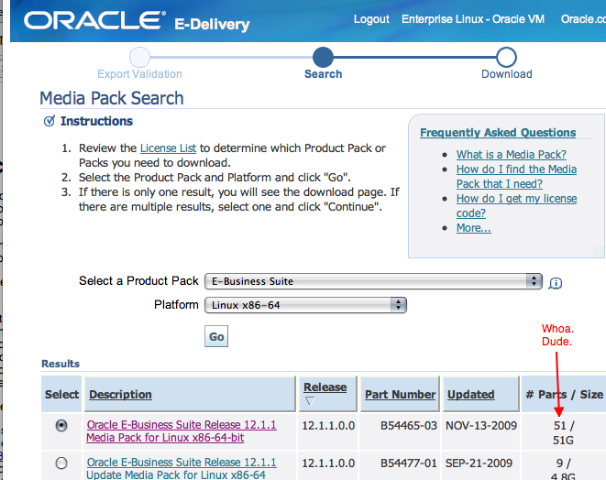
You don't need to download all of the files listed on the page, but you're still going to be grabbing about 45GB. You might want to fix yourself a snack while you wait. The media is separated as if to be burned to DVD. For this exercise, however, we won't be burning DVDs. Be sure to grab all of the parts labelled:
- "Oracle E-Business Suite Release 12.1.1 for Linux x86-64 Rapid Install Start Here"
- "Rapid Install RDBMS - Disk 1" "Rapid Install Databases - Disk 1" through "Rapid Install Databases - Disk 9," inclusive
- "Oracle E-Business Suite Release 12.1.1 for Linux x86-64 Rapid Install Tools - Disk 1"
- "Oracle E-Business Suite Release 12.1.1 for Linux x86-64 Rapid Install APPL_TOP - Disk 1"
- "Oracle E-Business Suite Release 12.1.1 for Linux x86-64 Rapid Install APPL_TOP - Disk 2"
Once you have all of the media, unzip the files into the stage directory on your Linux server. When the unzip utility asks if you want to replace dvd.label or component.label files, answer yes. If you get any other errors from unzip, you may have a corrupt download, and should re-download that zip file. Don't assume you can work around it. Once you've unpacked all of the files, your stage directory should look like this:
At this point, you'll be ready to start the installation (finally!). Hopefully, by the time you're done building your Linux server and downloading and staging the EBS software, the next installment in this series will be up. ;-)
[root@londo R12stage]# ls
oraAppDB  oraApps  oraAS  oraDB  startCD
Additional References
- A short OTN forum thread about laptop/workstation sizing for an EBS install
- Oracle Applications Release Notes, Release 12.1.1 (Doc ID 798258.1)
- Oracle E-Business Suite Documentation Library OTN-hosted documentation for Release 12.1
- Oracle Applications Installation Guide: Using Rapid Install Consider this your homework prior to the next post in this series.
Caveats, disclaimers, and assumptions
- This guide is intended as a roadmap for people who are self-directed enough to tinker if things go wrong. I'm presenting a series of steps that have worked for me, written up as I performed them, so it's all worked at least once. No, really. Honest.
- If you use this guide to deploy a system intended for production use, then your project timeline and maybe even your job are at risk. In other words: "No guarantees, warranties, express or implied, proceed at your own risk, blahblah fake legalese etc"
- There are individuals and organizations out there that provide thorough, professional-grade training on installing and maintaining Oracle Applications. Please do not make the mistake of equating their excellent, polished work with a handful of blog posts by some random dude on the Internet. :-)
- Similarly, part or all of the material presented here may have been covered on other blogs. Please share links to your favorite resources in the comments.
- This guide assumes some level of familiarity with Linux, or at least the ability to use Google to find instructions on installing, configuring, and working with Linux. Extensive Linux tutorials are beyond the scope of this guide; heaven knows I'm verbose enough as it is.


14 comments:
John
Your 4 part article on installing EBS was really appreciated and the generous way you have shared your knowledge. I have struggled to get the APPS server to install/start up reliably and it was reassuring to know that I am not the only person to experience this.
Simon Glass
Hi John,
Very nice series! Good that Oracle has simplified the EBS install process over the years ;-)
I'd highly recommend putting in a strong suggestion to do an MD5 check before starting the install. For R12.1.1 see My Oracle Support note 802195.1. Although it does take a few minutes, it's really worth it if there is an issue with the staging directory - which I've hit a couple of times and wasted substantially more time/stress than the time it takes to do the MD5 check.
Regards,
Gareth
This is a great guide. Do you know if there is an Amazon EC2 instance that would be appropriate to use for the installation? I would rather do that than purchase a machine just for this. My desktop would not support the VM in terms of memory and diskspace.
@Gareth: Good point. I've generally had good luck with my downloads, so the MD5 check isn't always front-of-mind, but I *have* found it to be necessary in the past. Definitely better to have it as an SOP.
Thanks for the compliment on the series; that's great to hear from an EBS veteran. :)
@Daniel: I haven't looked at Amazon's EC2 offerings to see what's appropriate, but I think the guidelines in this post are a good minimum starting point. I definitely wouldn't go lower than 2CPUs/cores and 4GB of memory, and if it's easy or relatively inexpensive to bump that to 4 cores, you won't be sorry.
@john, @daniel,
I wonder if it is legally possible to create an image and put it on EC2...I would love something like that, one that I could just spin up for myself (without the 1.5 months of pain john caused me...though I wouldn't have learned what a sadist john is).
Not sure who to ask? Maybe the twitterverse could help?
This is an awesome guide. Any suggestions on applying patches to this kind of vision env? I need 12.1.3 or the latest of vision to test a few product hub and other features.
Hi Cable Guy,
It looks like 12.1.1 is still the latest that you can download from Oracle EDelivery. If you want to get to 12.1.3, you'll need to apply a few patches to your instance. Here are a few references to get you started:
Note 1080973.1: Oracle E-Business Suite Release 12.1.3 Readme
Note 1066312.1: Oracle E-Business Suite Applications Technology Readme for Release 12.1.3 (R12.ATG_PF.B.delta.3, Patch 8919491)
If you're not already familiar with E-Business Suite patching procedures, the following document from the R12 docset should help get you up to speed:
Oracle® Applications Patching Procedures Release 12.1
One of these days I may get around to writing the "applying your first patch" appendix to this guide. Until then, this info will have to do. :-)
Any updates on your patch application primer?
Hi - How can we access the Guest EBS installed on Linux/VMWare Player from the host Windows 7 via HTTP/URL? Please help!
@The Cable Guy
If you are on a home network, you should be able to use either the IP address or your host name of your guest system to access the web front end.
I'm not too familiar with VMWare, I use VirtualBox with Bridged Adapters (and please don't ask me what that is).
chet
Hi,
I have paid for the pdf version for installing EBS. But didn't receive the pdf. Can you please forward.
Hi Anonymous.
Sorry about that. Would you send me your receipt to my email? I can send you a copy immediately.
chet
Hi
We are starting to setup a erp lab for R12 and 11i (mostly vIS env;s)
we have a CSI number, PLease can you tell me what is the budget involved for this?Like can I download from edelivery.oracle.com.I guess this will give me only a 30 day trial period. Can I get the DVDS from the support since I have a CSI number. if so what cost will be involved.
can u also advise on the OS. is RHEL5 free to be used?
Hi Anonymous,
I would highly encourage you to reach out to an Oracle Sales rep for advice.
Software downloaded from edelivery or OTN doesn't technically have an expiration, it's built on the honor system.
RHEL5? I'm not sure how Red Hat does their licensing. My first thought is that you pay for support if you want or need it, but that's it, the software is free to use (I could be very wrong about that, so talk to a Red Hat rep).
As for cost, again, would depend on your situation. An Oracle Sales rep would be best suited to help you determine that.
Hope that helps.
chet
Post a Comment