Showing posts with label sql developer. Show all posts

Thursday, February 21, 2013

Run Scripts in SQL Developer

I finally decided to save a script that cleans out a couple of tables for me.

Now I have a script, how do I run it in SQL Dev? In SQL*Plus, I would run it like @clean_tables. Two things to note there, 1, I didn't have to put the extension on the file and b, I assumed SQL*Plus was running from the directory where my file was located. If I was running the script from a different directory, I would have to use either a relative path...or something, but I digress.

I wanted to be able to run my script in a SQL Developer worksheet. How?
@clean_tables

Error starting at line 38 in command:
@clean_tables
Error report:
Unable to open file: "clean_tables.sql"

Twitter. Jeff Smith hangs out there, a lot. He supposedly has a real job as the Senior Assistant Principal Skinner Product Dude for SQL Developer at Oracle. Crazy title, I know. Back to Twitter.

Since he lives there (Twitter) (and I'm glad he does), I got an immediate response. Yay for Jeff.

Wait, what? Parent file? WTF are you talking about?

(I then remove the snark and try to put more details)

(oh, and I don't like that I can't just embed a single tweet...sorry, their fault, not mine)


Two seconds later:


Tested, and it works. Yay for me. Yay for Jeff.


In case it isn't obvious, I'm being sarcastic. Jeff is a fantastic advocate for SQL Developer. Yes, he gets paid to do it, but he goes above and beyond on a daily basis. Oracle is lucky to have him.

Sunday, February 10, 2013

Fun with Date Math

(First off, sorry Mike, I'm hoping this will break my writer's block...)

On Friday I was asked to look at a report that wasn't returning all of the data. Sample:
Year/Month  Total Sales Total Sales (YAGO)
------------------------------------------
01/31/2013   $1,000,000           $900,000                
03/31/2013                        $950,000
For reference, YAGO is "Year Ago."

Notice anything funny there?

Yeah, February is missing. The (OBIEE) report has a filter on Jan, Feb and Mar of 2013. But it wasn't showing up. I confirmed via manual SQL (hah!) that there was (YAGO) data in there for February. Any ideas?

I immediately suspected one of two things:
- If the Date (month) dimension had a "year ago" column it was wrong.
- The join in OBIEE was doing it wrong.

I checked the date dimension first. It was fine. It didn't even have a YAGO column, so nothing to see there. I looked at the join between the date dimension and the fact table...
(YEAR ("DW".""."DW"."My_Month_Dim"."MONTHEND_DATE" ) - 1 ) * 10000 
+  MONTH ("DW".""."DW"."My_Month_Dim"."MONTHEND_DATE" )  * 100
+ CASE WHEN DayOfMonth("DW".""."DW"."My_Month_Dim"."MONTHEND_DATE") = 29 THEN 28 ELSE
DayOfMonth("DW".""."DW"."My_Month_Dim"."MONTHEND_DATE")  END 
= "DW".""."DW"."My_Fact_Table"."MONTH_DIM_KEY"
I want to tear my eyes out when I see stuff like that. I don't even want to know what it does. * 1000? * 100? Shoot me.

OK, so the MONTH_DIM_KEY is in the YYYYMMDD format. MONTHEND_DATE is a date data-type that corresponds to the last day of the month. For February 2013, it's 20130228, For February 2012, it should be 20120229. <<< Leap Year!!! I'm going to make a wild guess and say that the formula up there isn't working. How to test it though? That's logical SQL (OBIEE), it doesn't run in the database. I just ran the report and grabbed the SQL submitted to the database. This is what it looked like:
          AND ( TO_NUMBER( TO_CHAR( MONTHEND_DATE, 'yyyy' ), '9999' ) - 1 ) * 10000 +
          TO_NUMBER( TO_CHAR( MONTHEND_DATE, 'MM' ), '99' ) * 100 +
          CASE
            WHEN TO_NUMBER( TO_CHAR( MONTHEND_DATE, 'dd' ), '99' ) = 29
            THEN 28
            ELSE TO_NUMBER( TO_CHAR( MONTHEND_DATE, 'dd' ), '99' )
          END = MONTH_DIM_KEY
  AND( MONTHEND_DATE IN( TO_DATE( '2013-01-31', 'YYYY-MM-DD' ), TO_DATE(
  '2013-02-28', 'YYYY-MM-DD' ), TO_DATE( '2013-03-31', 'YYYY-MM-DD' ) ) ) 
Eyes are burning again. This is also the "prettified" SQL after I hit Ctrl + F7 in SQL Developer. The very first thing I do with OBIEE generated SQL.

One part of that wouldn't be so bad, but it's three formulas adding up to some mysterious number (presumably the last day of the month, for the previous year, in YYYYMMDD format). So I moved all those formulas up into the SELECT part of the statement. Let's see what they are doing.
SELECT
  ( TO_NUMBER( TO_CHAR( MONTHEND_DATE, 'yyyy' ), '9999' ) - 1 ) * 10000 part_1,
  TO_NUMBER( TO_CHAR( MONTHEND_DATE, 'MM' ), '99' ) * 100 part_2,
  CASE
    WHEN TO_NUMBER( TO_CHAR( MONTHEND_DATE, 'dd' ), '99' ) = 29
    THEN 28
    ELSE TO_NUMBER( TO_CHAR( MONTHEND_DATE, 'dd' ), '99' )
  END part_3
FROM my_month_dim
WHERE MONTHEND_DATE IN ( TO_DATE( '2013-01-31', 'YYYY-MM-DD' ), 
                         TO_DATE( '2013-02-28', 'YYYY-MM-DD' ), 
                         TO_DATE( '2013-03-31', 'YYYY-MM-DD' ) )
That resulted in this:
PART_1         PART_2         PART_3
20120000       100            31
20120000       200            28
20120000       300            31
So PART_3 is definitely incorrect. Am I going to bother to figure out why? I have some serious issues inside of my brain which simply do not allow me to do date math. I avoid it at all costs...instead choosing to use whatever the system provides me.

One of my favorites, especially when dealing with leap years, is ADD_MONTHS.

If date is the last day of the month or if the resulting month has fewer days than the day component of date, then the result is the last day of the resulting month

That's why. Add -12 months to February 28, 2013. You don't get back February 28, 2012, you get back the 29th, as it should be. Do the same thing starting with February 29th, 2012. Add 12 months, subtract 12 months. It's always right. Yay for someone figuring this out so I don't ever have to do so.

Sadly, OBIEE doesn't have the equivalent of ADD_MONTHS (or LAST_DAY), you have to build out a string and then concatenate it all together, not pleasant. So I cheated, I used EVALUATE. Here's my working solution.
TO_NUMBER( TO_CHAR( ADD_MONTHS( MONTHEND_DATE, -12 ), 'YYYYMMDD' ) ) = DW_MONTH_DIM_KEY
Oops, that's the physical SQL. How about the OBIEE SQL:
CAST( EVALUATE( 'TO_NUMBER( TO_CHAR( ADD_MONTHS( %1, %2 ), %3 ) )',
 "EDW".""."DW"."Dim_DW_MONTH_DIM_CBM"."MONTHEND_DATE", 
-12, 'YYYYMMDD' ) AS INTEGER ) = "DW".""."DW"."My_Fact_Table"."MONTH_DIM_KEY"

Friday, May 25, 2012

SOUG: That Developer Guy

Not sure if you've heard of this guy. I've written about his tool, err...I mean his former tool...gah, I mean his former IDE before.

Jeff Smith left the dark side to join the mothership, Oracle, late last year. Last night, he visited us down here in Tampa.

He was here once before, when he worked from that other company. You can read about that visit here.

For those who have come to our user group, it's heavy on the DBA side. Not may developers. Not sure what that really has to do with anything, just thought I'd mention it.

You can find him on Twitter and his blog. If you don't know who he is, then you've probably never 1, used Toad, 2, used SQL Developer or SQL Developer Data Modeler C, you don't drink beer and F, you're not from West Virginia. You might count yourself lucky on that last point.

In a surprise twist, for me anyway, I'm not the first to write about Jeff's visit to Tampa. Jon Bloom from Bloom Consulting BI beat me to the punch. I concur with everything that Jon says.

Jeff was his usual self, maybe a Stephen Wright of Presenting. Dry and always funny with great audience interaction. I'm hoping my presence helped as he picked on me quite a bit, but I'm sure he'd have found someone if I wasn't there. I picked up a few cool new tricks. We talked about Twitter (naturally), had debates about the cloud (seriously derailed there) and whether or not you should write code (procedures, functions, packages) directly in the database. Good times.

Jeff is a must see.

Of course there was an after party. I had planned on spending some more time with Jeff than I did, but I had production issues to take care of. Besides, I think he was busy napping. Anyway, Troy (SOUG President), the aforementioned Dan McGhan, Michael (I'm not allowed to print his real name, this is a family blog), myself and Jeff headed over to Ybor city. Jeff wanted a cigar and while in Rome...We sat outside of King Corona for an hour or two and chatted about lots of things. Jeff told us all the cool new features coming out in 12c (OK, I lied...we tried to ply him with beer but he wouldn't divulge any secrets).

No pictures for you today. I wasn't in a picture taking mode. I did try to take a panoramic of the presentation, but my phone/camera borked.

Oh yeah, Jeff yelled at me for replacing his kid's picture...so I put it back up (for at least a day).

Thursday, September 30, 2010

SQL Developer Goodie

I've been using SQL Developer since the Jurassic times when it was known as Project Raptor. Tonight I found some new goodness.

I am currently searching for a way to initialize an EBS session from SQL*Plus (or SQL Developer), in other words, not through the normal channels. If you try to query the database directly, you'll get nothing back because there is some application context stuff going on. (Note to self: Before going and saying there is no data in Table A, make sure there are no policies (VPD) or some sort of application context needed to access said table).

So I'm going through all these FND_ tables one by one to find the values I need. It gets a bit annoying though, because I would run one SQL statement and then another, and then go back to the first to see the results of the first one.

To combat this, I would open up 2 worksheets side by side, one to have the results of my first query and the 2nd to run my ad-hoc stuff that I would compare.

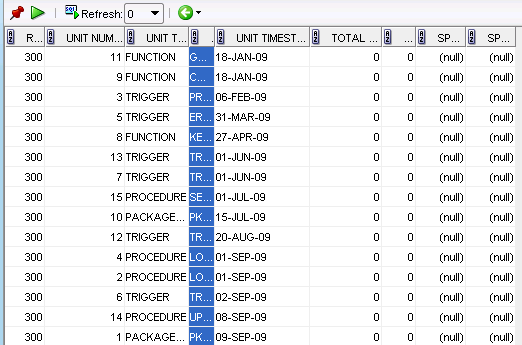
In the process, I noticed, for the very first time, these little green arrows at the top of the result set.


So I clicked on one...what's this? The results from the previous query? Awesome!

I'm sure it has a fancy name and I'm sure Kris Rice will tell us what it is...at least I hope he does.

Monday, August 30, 2010

SQL Developer: Turn Off "Autogenerate GROUP BY"

This is more for me since I seem to install it quite regularly.

I've been snagging the SQL from OBIEE query logs (nqquery.log), which doesn't come out too pretty.

So that I don't have to manually format 400 lines of SQL, I created a formatting template. Ctl - F7 and voila!

I do go back in and make small changes, which is why I am writing this. As I scroll down through the file and indent or change code, the GROUP BY clause is auto-generated, which is annoying to me.

To turn it off is easy (if you can remember, which I can't, which is why I write this).

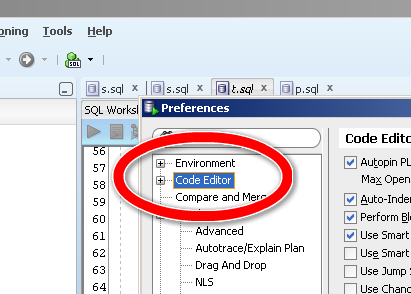
Go to Tools - Preferences then look for Code Editor:

Code Editor

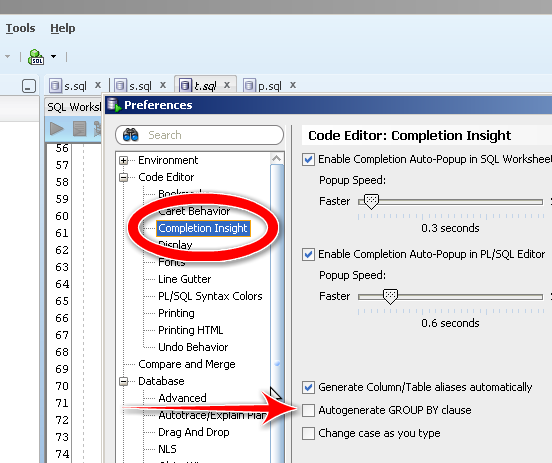
Expand that group and then go to Completion Insight:

completion insight

Uncheck the box next to the arrow and you're done.

My hope is that in the next version of SQL Developer, we'll be able to call the SQL Beautifuler from the command line. That would be pure awesome.

Monday, March 8, 2010

SQL Developer: Install Unit Testing Repository

Get the latest SQL Developer release here.

I'm not a big tools guy, I prefer SQL*Plus to anything else. I especially don't like paying for tools (yes, the database is a tool and costs a lot of money...I do realize the hypocrisy).

After Syme Kutz's presentation at SOUG, I've been looking more closely at SQL Developer. I've been using it (and JDeveloper) since they were both made freely available a few years ago. Mostly for the schema browsing, looking around, importing and exporting data. I do use it (SQL Developer) to write reports that I can share with the Business folks as well.

Syme's presentation was primarily on Unit Testing (which I begged for). First step to using Unit Testing is to install the repository, a set of tables the application uses to build and store tests and their results.

You need to have version 2.1 or greater.

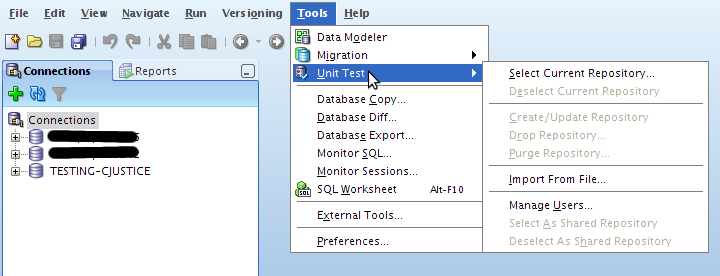
First up, go to Tools --> Unit Test --> Select Current Repository

select repostory

You'll be prompted to select a connection (i.e. database) to use

select connection

Would you like to create one now? Select Yes.

no repository found

You're then told the the required roles do not exist, select OK.

roles do not exist

Confirm running SQL

confirm sql

Running...will take just a few seconds

running

Success!

success!

That's it. Easy right? Future posts will detail managing users and creating tests.

Tuesday, March 2, 2010

DBA_TABLES vs DBA_OBJECTS

CJUSTICE@TESTING>SELECT * FROM V$VERSION;

BANNER
----------------------------------------------------------------
Oracle Database 10g Enterprise Edition Release 10.2.0.3.0 - Prod
PL/SQL Release 10.2.0.3.0 - Production
CORE 10.2.0.3.0 Production
TNS for 32-bit Windows: Version 10.2.0.3.0 - Production
NLSRTL Version 10.2.0.3.0 - Production
Last night I was installing the Unit Testing repository for SQL Developer for a fun little post. After installing the repository, I just did a brief sanity check.
CJUSTICE@TESTING>SELECT owner, COUNT(*) c
2 FROM dba_objects
3 GROUP BY owner
4 ORDER BY 1;

OWNER C
------------------------------ ----------
...snip
SI_INFORMTN_SCHEMA 8
SYS 22970
SYSMAN 1341
SYSTEM 454
S_NQ_SCHED 3
TSMSYS 3
WMSYS 242
XDB 682

27 rows selected.
Strange.

I created a user, UNIT_TESTING, to house the data and fed it to SQL Developer. Did I create the user?
CJUSTICE@TESTING>SELECT COUNT(*) 
FROM dba_users
WHERE username = 'UNIT_TESTING';

COUNT(*)
----------
1
Yeah.

I check DBA_OBJECTS using UNIT_TESTING as the predicate:
CJUSTICE@TESTING>SELECT * FROM dba_objects WHERE owner = 'UNIT_TESTING';

no rows selected
Really?
CJUSTICE@TESTING>SELECT table_name
2 FROM dba_tables
3 WHERE owner = 'UNIT_TESTING';

TABLE_NAME
------------------------------
UT_LIB_TEARDOWNS
UT_LOOKUP_CATEGORIES
UT_LOOKUP_DATATYPES
UT_LOOKUP_VALUES
UT_METADATA
UT_TEST
UT_TEST_ARGUMENTS
UT_TEST_IMPL
UT_VALIDATIONS
UT_TEST_IMPL_ARGUMENTS
UT_LIB_STARTUPS
UT_LIB_VALIDATIONS
UT_LIB_DYN_QUERIES
UT_SUITE
UT_SUITE_TEST
UT_TEST_IMPL_VAL_RESULTS
UT_TEST_IMPL_ARG_RESULTS
UT_TEST_IMPL_RESULTS
UT_TEST_COVERAGE_STATS
UT_TEST_RESULTS
UT_SUITE_RESULTS
UT_SUITE_TEST_RESULTS

22 rows selected.
WTF?

Does this mean that my data dictionary is corrupted? This is a sandbox so it is very well possible...just never seen this kind of thing before.

Update 03/29/2010
I figured it out, user error...explanation is here.

Friday, February 26, 2010

SOUG: SQL Developer with Syme Kutz

Tonight was the Suncoast Oracle User Group (SOUG) meeting with Syme (pronounced Sim-e, I thought it was Si-me) Kutz of Oracle presenting on SQL Developer, mainly the new Unit Testing functionality.

Unfortunately, I missed the first half of the meeting due to a flight delay, but from what I did see, it's very cool. If you read the announcement last week, you'll remember that Kris Rice had offered up (aka - threw under the bus) Syme. I made first contact and then passed the baton to our meeting coordinator who finalized the arrangement.

If you want to check out the Unit Testing features, you need the latest release (2.1), which can be found here. To access it, go to Tools --> Unit Testing

unit testing

I won't go into gory details simply because I need to use the dang thing first. I'm sure I'll have some posts in the near future.

Anyway, what I did see was pretty slick.

Syme then gave us some history of the product (developed originally by himself and Mr. Rice) and explained a bit more about some of the functionality. Many of you already know about the integration with APEX (I don't know much, other than it exists). That's about to be expanded and will give even more control over many aspects of APEX, including some pretty tight integration with the Unit Testing module.

One really cool thing that he mentioned, if you open up a trace file in SQL Developer, you get a pretty report for it. Apparently reverse engineered from tkprof.

First, find your trace file:

find trace file

Double click it to open it and you'll see something like this (you'll have to click through on this one):


I will break it down if you're too lazy though.

The first column of the report is the SQL:


Next up are the statistics:


Waits:


and finally Row Sources:


Pretty slick stuff.

Thanks Syme for coming down, hopefully we can get you down here again to show us the rest.

Sunday, February 21, 2010

SOUG: SQL Developer Unit Testing

This week the Suncoast Oracle Users Group will be hosting Syme Kutz, Senior Architect for Database Tools at Oracle.

Update
I received Syme's bio (from Syme of course). It's pretty impressive...
I started working at Oracle in October of 1995 in the Systems Performance Group of Consulting under Cary Millsap.

I then spent 8 years tuning the Database and Oracle Applications. My Experience tuning application lead me to work with Max Schierson fixing and Tuning iStore. I left consulting and moved into Applications It working for Max at Headquarters were our focus was building custom applications to better facilitate oracle policies and programs. I built custom applications until a position opened up on APEX the development team. After rebuilding the Database management side of APEX, Kris Rice and I began the Sql Developer project. When the group split and Sql Developer became a product I followed. I have been a developer on Sql Developer since then building various functionality, such as reports and Unti Testing.
We "found" Syme through Kris Rice who unceremoniously offered his services up on Twitter.


After much wrangling and negotiating, we finally managed to talk Syme into coming down from Orlando.

According to Kris, Syme was heavily involved with the new Unit Testing functionality of SQL Developer. We all know how much testing us database folks do, so it makes perfect sense right?

Anyway, if you're in town and Thursday, please come by and check out Syme's presentation, it should be very interesting.

Thursday, September 24, 2009

SQL Developer: 2.1 Early Adopter 1 (2.1.0.62.61)

Reason #23 to use Twitter, beat the press.

Let's check out the feed for Oracle Press Releases:


Nope, nothing there.

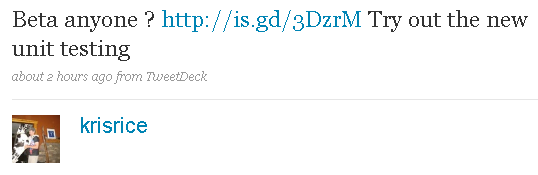
On twitter though, you have the (in)famous Kris Rice, Product Manager or something in charge of SQL Developer.


Check out the Feature List.

Download it here.

Probably the biggest surprise, to me anyway, was the inclusion of a unit testing framework. Haven't had a chance to check it out yet but you can find a tutorial here.

Wednesday, September 9, 2009

SQL Developer: Drill Down Reports

Finally, finally I've figured this out. I've googled "SQL Developer Drillable Reports" to no avail. The solution kept alluding me.

The first result you should get back is one from a fellow Tampan (Tampon?), Lewis Cunningham, from July 2006. OK, it's a bit old (I think it was still called Raptor back then), but I'll give it a try.

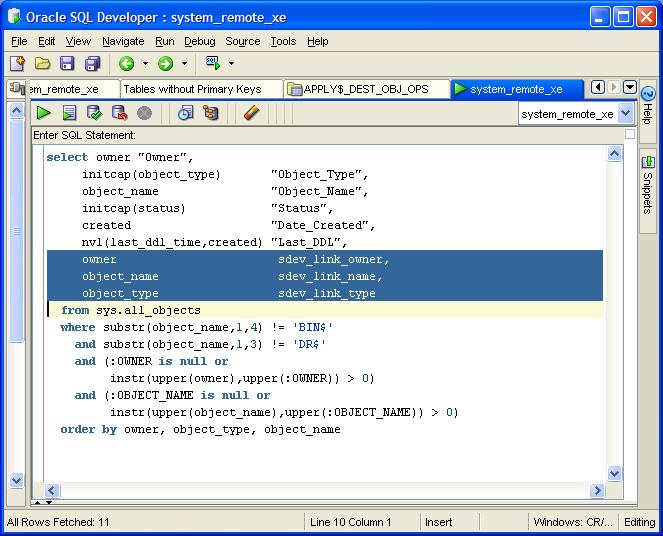
In it, Lewis talks about creating additional "pseudo" columns, SDEV_LINK_NAME, SDEV_LINK_OWNER, SDEV_LINK_OBJECT which appear to map to the corresponding columns in DBA_OBJECTS.


I tried that, and got...nothing. I tried changing the alias(es) to match the column I was using, again, to no avail.

Let me back up just a tad, I'm trying to create some reports based on the PLSQL_PROFILER_% tables:

* PLSQL_PROFILER_RUNS
* PLSQL_PROFILER_UNITS
* PLSQL_PROFILER_DATA

It's annoying to have to rewrite the SQL everytime. I did create a @profile script, but I had to pass the RUNID; so first, I had to know the RUNID.

So I took to Twitter as I know Kris Rice hangs out there sometimes.


That was last week, and I have been unable to get this to work. I could have sworn Kris had a good tutorial on it, but I think I confused it with the extensions you can create.

Anyway, I'm at it again tonight and I end up back at the link Kris originally pointed me to. For some reason (cough) I missed this crucial little nugget this first time
(the bind variable is case-sensitive)
Really? Could it be that easy? I UPPERed RUNID and voila! It worked!

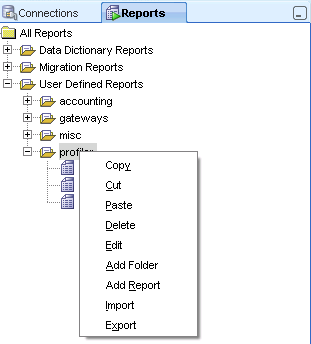
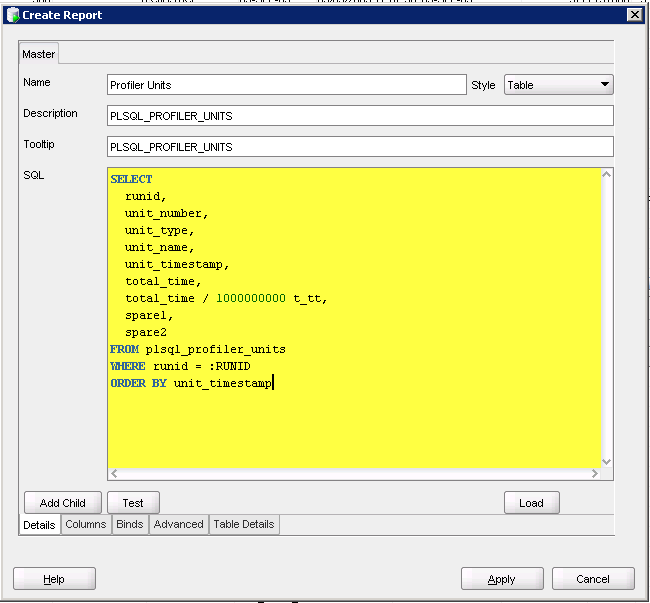
To recap, go to the Reports tab, right click on a folder (I have one named "profiler") and select Add Report.


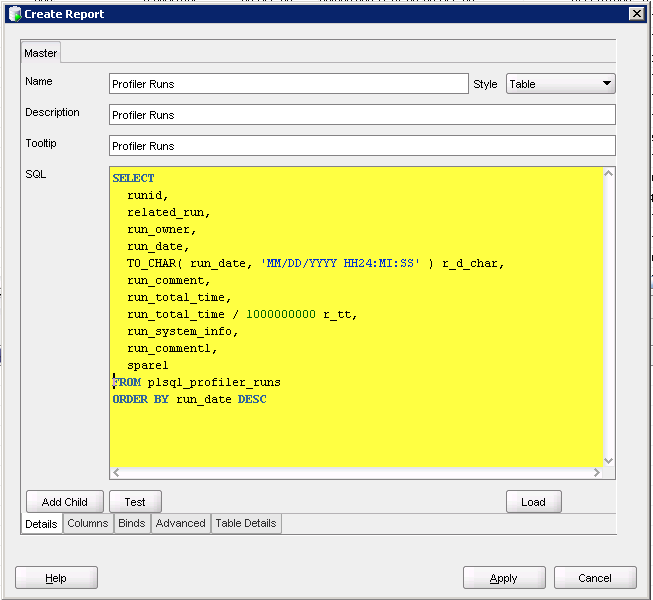
I fill out the Name, Description and Tooltip (optional)


Hit Apply which saves my report. Now I want a report that on PLSQL_PROFILER_UNITS that accepts the RUNID as an IN parameter.

First, create the report:


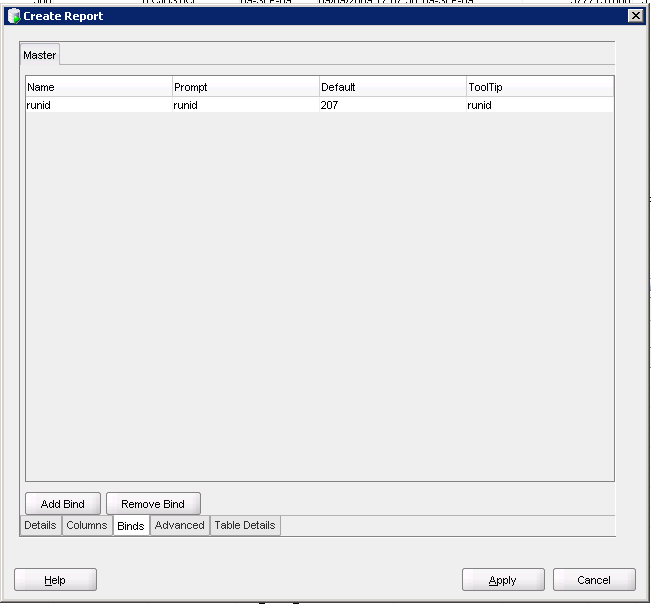
Go to the Binds tab and fill in the fields


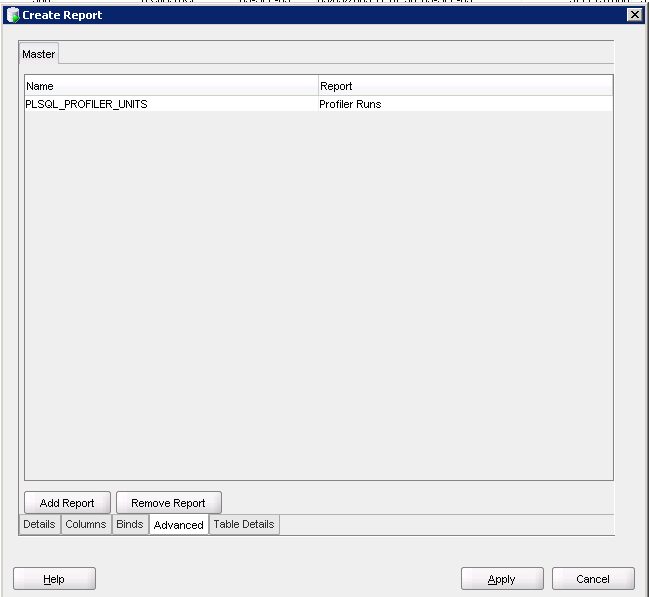
Go to the Advanced tab and fill in the name of the report


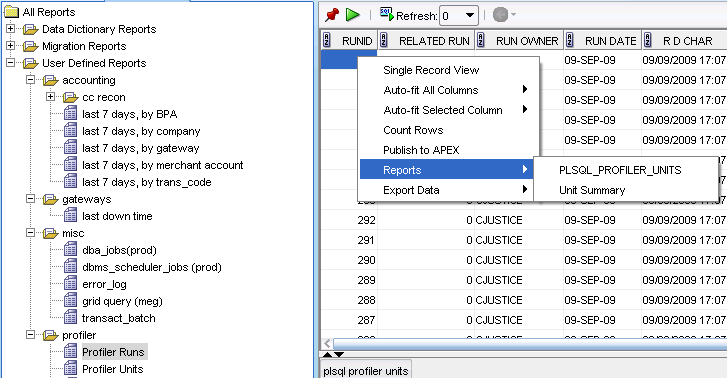
Now, select your first report, right click, go to Reports and select the report you just created


Perfect!

Just a small reminder, the bind parameters are CASE SENSITIVE!