After trying out the lazyweb method of search (aka
Twitter) and not getting much help, I resorted to help at the OTN
OBIEE Forum. It's not Twitter's fault, I think this problem was a bit too complex to describe in 140 characters.
Here's the
post on OTN. I started to get nervous too, I posted on Friday and hadn't had a response...until today. 3 days? Man...that's way too long!
Here's the short of it.
Our reports were coming out funny. Dimension column headings had one style and the Fact table column headings had another.
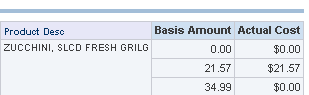
Using
Firebug, I could easily isolate the sections.
On the Dimension column, the definition looked like this:
<th
  class="ColumnHdg"
  style="background-color: rgb(231, 231, 247); font-size: 9px; color: rgb(0, 51, 102);"
  scope="col"
  dir="ltr">Product Desc
</th>
The Fact table column was defined as:
<th
  class="ColumnHdg"
  scope="col"
  dir="ltr">Basis Amount
</th>
Note the style attribute...that overrides any class settings. Very annoying.
I thought it would be relatively simple to fix. I worked with custom messages
before, this had to be similar. So I began to "grep" the messages directory
c:\oraclebi\web\msgdb\>findstr /i /m /s /c:"background-color" *.*
Nothing.
How about looking for the name of the class, ColumnHdg?
c:\oraclebi\web\msgdb\>findstr /i /m /s /c:"columnhdg" *.*
messages\criteriatemplates.xml
messages\formattemplates.xml
messages\mktgadminuitemplates.xml
messages\mktgcommontemplates.xml
messages\mktglistformattemplates.xml
messages\mktgsegmenttemplates.xml
So I start with criteriatemplates.xml and find the reference to columnHdg (just now realizing that the case doesn't match...oh well). That was part of the WebMessage kuiColumnFormulaEditor. So I searched for that...
You see where I'm going.
That lead me to the javascript files (of which there are tons). Nothing...not a single thing that could possibly be adding this style attribute.
That's when I mapped the dev server drive to my local computer and opened up
WinMergeI then began to compare every single file in both the msgdb and res (javascript) folders. I would then compare the files that were different to see if that could be the cause. Still...nothing.
I had looked in the webcat before, but couldn't find anything of global significance. I was headed back there though since I had lost hope with custom messages and/or javascript.
Then I got a message from the OTN Forum Administrator...could it be? Looked at the name of the person who answered it first,
John Minkjan...sweet!
Looks like you forgot to reset the OOB settings when installing OBIEE:
have a look here to reset them:
http://obiee101.blogspot.com/2009/02/obiee-editing-system-wide-defaults.html
Click through, follow his instructions, bounce the server and voila!

As of this writing, I don't know what OOB stands for; I could make something up, but it probably wouldn't be appropriate for this family site.
Thanks John!


